 condoo.Vibe
The Four Modes: Build, Plan, Explore, Debug
Choose the right condoo.Vibe mode for each request, from creating features to planning, exploring, and debugging your application confidently.
condoo.Vibe gives you four modes for working with your AI product team:
Build, Plan, Explore, and Debug.
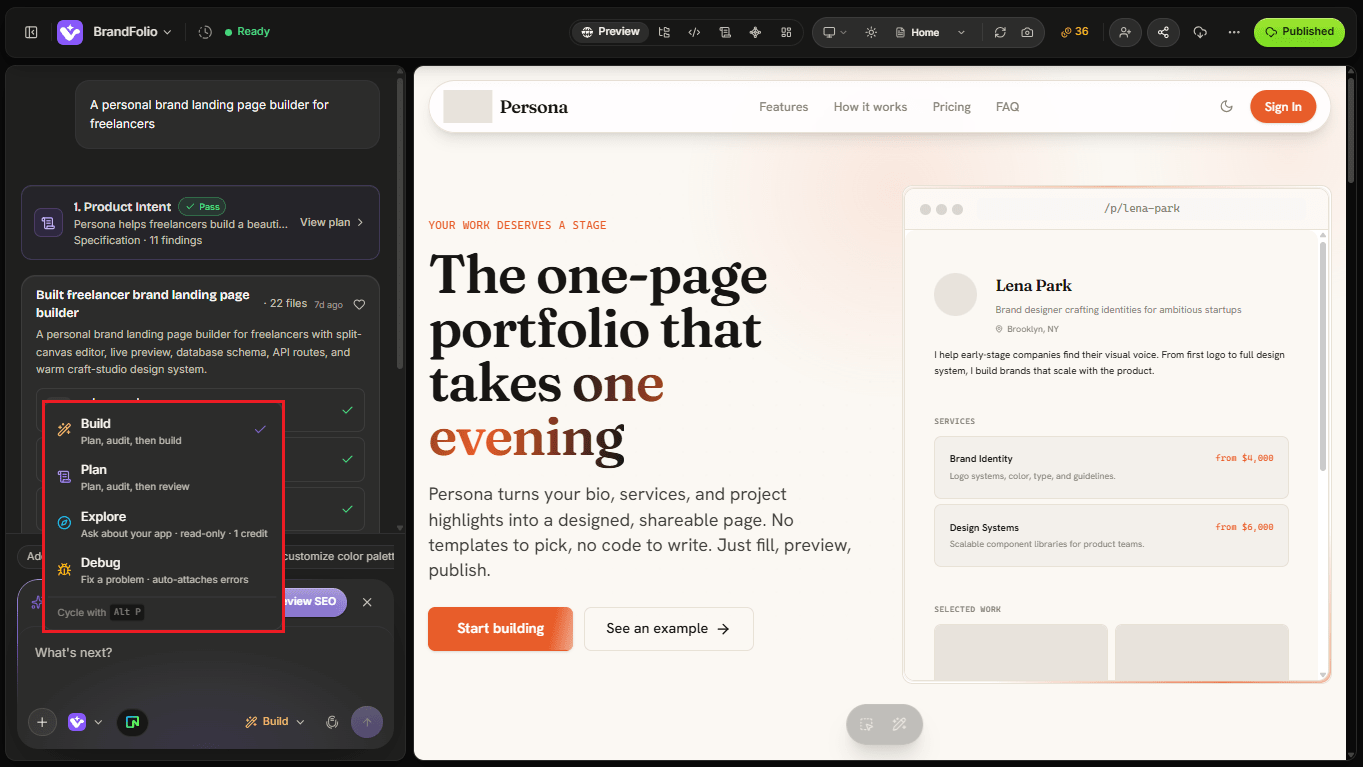
Each mode changes how condoo.Vibe approaches your request.
You don't need to use the same mode throughout a project. You can switch modes depending on what you're trying to accomplish.
A simple way to think about them is:
| Mode | Use it when you want to... |
|---|---|
| Build | Create or change something |
| Plan | Think through something before building |
| Explore | Understand your project or investigate possibilities |
| Debug | Find and fix something that isn't working |
Build Mode
Build Mode is for taking action.
Use Build when you know what you want condoo.Vibe to create, modify, or implement.
For example:
Add a pricing section with three plans to the homepage.
Or:
Create a customer dashboard where users can view their active subscriptions and billing history.
condoo.Vibe analyzes the request and works on the application.
Use Build when you want to:
- Create a new application
- Add a page
- Add a feature
- Change an existing feature
- Update the design
- Connect functionality
- Modify application behavior
- Implement an approved plan
Plan Mode
Plan Mode is for thinking before building.
Use Plan when the change is complex enough that you want condoo.Vibe to understand the requirements and determine an approach before implementation begins.
For example:
Add multi-tenant workspaces to this application. Each company should have separate users, data, roles, and permissions.
Instead of immediately changing the application, Plan Mode allows condoo.Vibe to think through what needs to happen.
A plan may cover areas such as:
- Product requirements
- User flows
- Application structure
- Data requirements
- Authentication and permissions
- Technical implementation
- Dependencies
- Potential issues
You can review the plan before moving into implementation.
Use Plan when:
- Building a complex application
- Adding a major feature
- Changing application architecture
- Introducing new user roles or permissions
- Adding complex workflows
- Making changes that affect several parts of the product
Explore Mode
Explore Mode is for understanding before deciding what to do.
Sometimes you don't want condoo.Vibe to immediately build or change anything.
You may want to understand your application, investigate an idea, evaluate possibilities, or figure out the best approach.
For example:
Analyze this application and explain how authentication currently works.
Or:
What would we need to change to turn this single-user application into a team-based SaaS product?
Or:
Review the current dashboard and suggest ways to improve the user experience.
Explore Mode is useful when the outcome of the conversation isn't necessarily code.
Use Explore when you want to:
- Understand an existing feature
- Analyze your application
- Explore product ideas
- Compare possible approaches
- Review existing functionality
- Ask questions about your project
- Identify opportunities for improvement
- Understand the impact of a potential change
Think of Explore as talking through the product with your AI product team before deciding what to do next.
Debug Mode
Debug Mode is for investigating problems.
Use Debug when something isn't working as expected.
Instead of treating the issue as a normal feature request, condoo.Vibe focuses on identifying the cause of the problem and determining how to fix it.
For example:
Users can submit the signup form, but they're not being redirected to the dashboard after registration. Find out what's causing this and fix it.
Or:
The application throws an error whenever I try to create a new workspace. Debug the issue and fix the underlying cause.
Debug Mode is useful for problems involving:
- Runtime errors
- Broken functionality
- Failed API requests
- Database issues
- Authentication problems
- Integration errors
- Unexpected application behavior
- Build errors
- Deployment-related problems
Give condoo.Vibe useful debugging context
When possible, include:
- What you expected to happen
- What actually happened
- Steps that reproduce the problem
- Any error message you received
For example:
When I click "Create Workspace," I expect the workspace to be created and the dashboard to open. Instead, nothing happens and the browser console shows a 500 error. Debug the complete flow and fix the underlying problem.
The more useful context condoo.Vibe has, the easier it is to investigate the issue.
Choosing the right mode
Here's a simple decision guide.
I know what I want created
Use Build.
Add a customer testimonials section.
I know what I want, but it's a major change
Use Plan first.
Add team workspaces, invitations, roles, and workspace-level data isolation.
I'm not sure what I should do yet
Use Explore.
Review my onboarding experience and suggest how we could improve activation.
Something is broken
Use Debug.
Google login redirects back to the login page instead of the dashboard. Find the cause and fix it.
You can switch modes as you work
The four modes aren't separate workflows.
They can work together throughout the lifecycle of your product.
For example, imagine you want to add subscriptions to your SaaS application.
Explore
Review the existing application and tell me what we would need to add subscription billing.
Use Explore to understand the problem.Plan
Create a plan for adding three subscription tiers with Stripe, feature access based on plan, and a customer billing portal.
Use Plan to structure the implementation.Build
Implement the approved subscription plan.
Use Build to create it.Debug
Subscription checkout works, but after payment the user's account still shows the Free plan. Find and fix the problem.
Use Debug when something doesn't behave correctly.
This is one of the advantages of treating condoo.Vibe as a product team rather than simply a code generator.
Different stages of product development require different kinds of thinking.
Quick reference
| If you want condoo.Vibe to... | Choose |
|---|---|
| Build something new | Build |
| Modify an existing feature | Build |
| Implement a design change | Build |
| Think through a complex feature | Plan |
| Design an architecture before implementation | Plan |
| Explain how something currently works | Explore |
| Review your product and suggest improvements | Explore |
| Compare different approaches | Explore |
| Investigate an error | Debug |
| Fix broken functionality | Debug |
| Diagnose an integration problem | Debug |
A simple rule to remember
If you're unsure which mode to choose, remember:
Build creates. Plan thinks ahead. Explore investigates. Debug fixes.
As you spend more time building with condoo.Vibe, choosing a mode will become natural.
Next: Plan Mode
Next, we'll take a closer look at Plan Mode, how condoo.Vibe turns complex requirements into a structured specification you can review before building.