 condoo.Vibe
Google (Gemini)
Connect Google Gemini to power AI assistants, generation, extraction, and multimodal features inside apps you build with condoo.Vibe.
The Google Gemini connector lets applications you build with condoo.Vibe use Gemini models for AI-powered features.
You can use Gemini inside your application for experiences such as:
- AI assistants
- Content generation
- Summarization
- Classification
- Data extraction
- Document analysis
- Multimodal workflows
- Customer support
- AI-powered automation
- Structured generation
Once Gemini is connected, tell condoo.Vibe what the AI feature should do inside your product.
Connect Gemini. Define the experience. condoo.Vibe builds the workflow around it.
condoo.Vibe vs Gemini
condoo.Vibe is the product-building environment.
Gemini is an AI provider your application can use as part of a feature.
For example:
Build a customer insights dashboard with contacts, support history, recent activity, and account health.
condoo.Vibe builds the application.
Then:
Add an AI Summary button that analyzes the customer's recent activity and generates a concise account summary using Gemini.
Gemini powers the AI step inside the product.
Before You Start
You'll need access to the Google AI service and the credentials required by condoo.Vibe's Gemini connector.
API usage may incur charges according to your Google account, selected model, and request volume.
Connect Gemini to condoo.Vibe
Open your condoo.Vibe project and navigate to Connectors.
Find Google Gemini and select it.
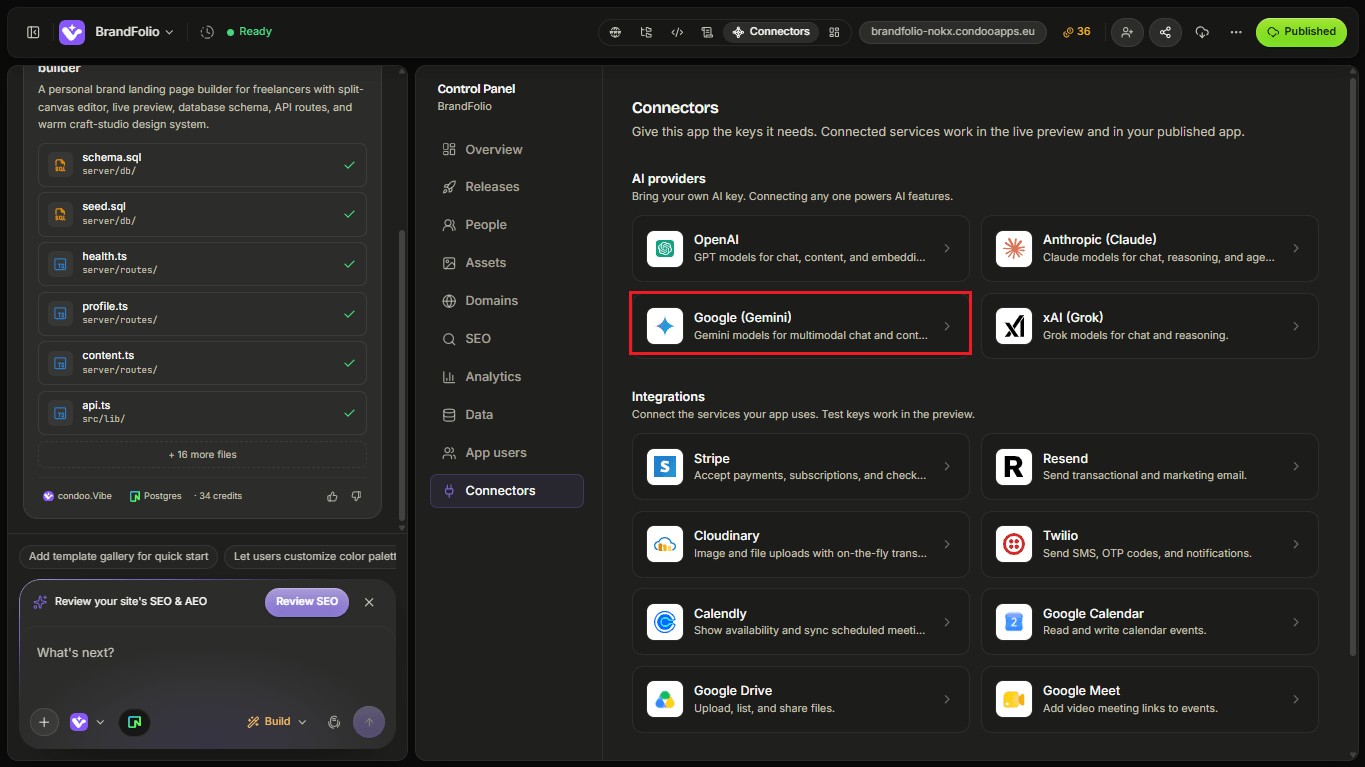
Follow the setup flow and provide the information requested by condoo.Vibe.
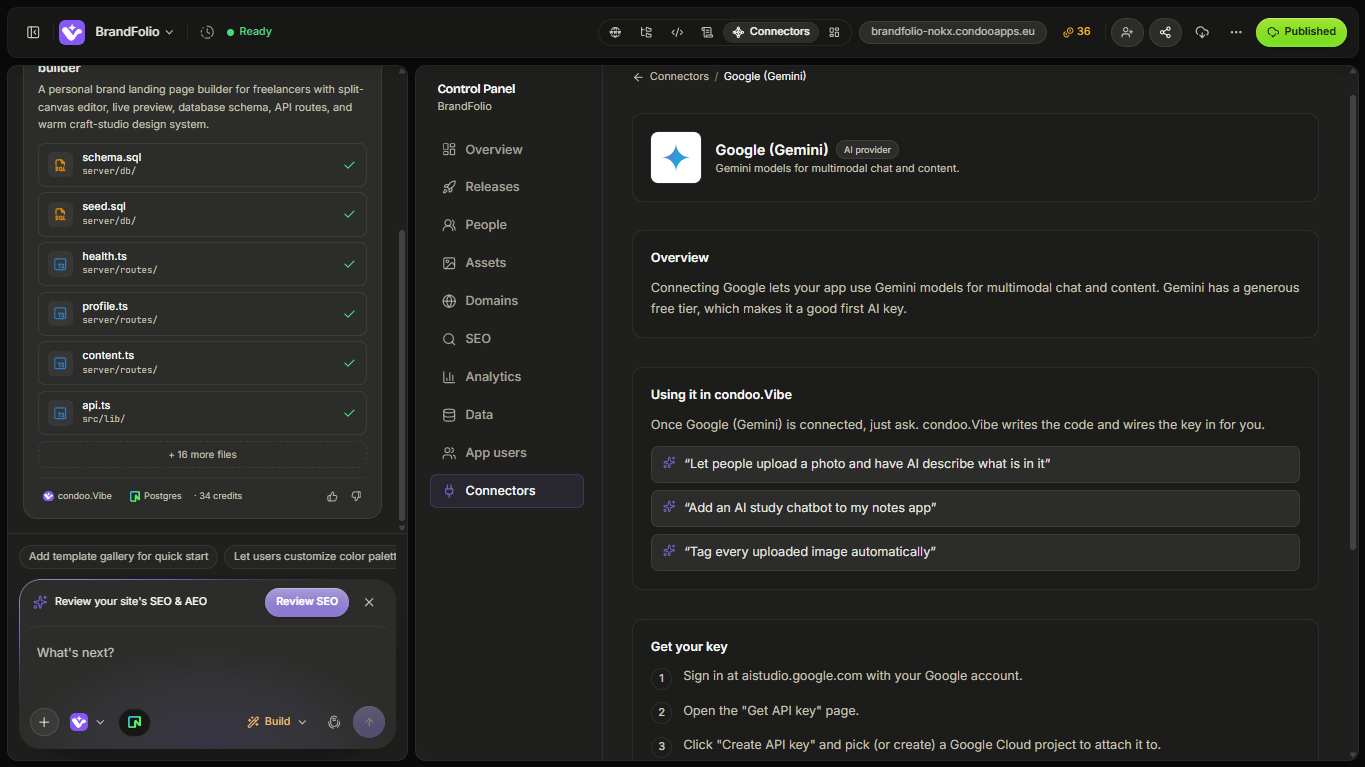
Once connected, Gemini becomes available for AI-powered features inside your application.
Build Your First Gemini Feature
Suppose you're building an e-commerce management tool.
You could tell condoo.Vibe:
Add an AI Product Assistant using Gemini. Users should provide a product name, features, audience, and tone. Generate a product description, five selling points, and three social media captions.
The workflow might look like:
Product Information
        ↓
Generate
        ↓
Server-Side Logic
        ↓
Gemini
        ↓
Structured Result
        ↓
Application
The user interacts with your product, not directly with the underlying model provider.
Define the Input
Tell condoo.Vibe what context the model needs.
For example:
Use the product name, category, features, target audience, price point, and brand tone.
Or:
Use the customer's latest enquiry and previous support messages.
Or:
Use the document text and the user's selected analysis goal.
The feature should provide Gemini only with the information relevant to the task.
Define the Output
Be clear about the result you want.
For example:
Return a 100-word product description, five bullet-point benefits, and three short social posts.
Or:
Return category, sentiment, urgency, and recommended next action.
Or:
Return an executive summary, key decisions, important dates, and action items.
This makes it easier for condoo.Vibe to build a structured experience around the response.
Example: AI Content Assistant
Suppose you're building a marketing platform.
You could ask:
Add a Content Assistant using Gemini. Users should enter their business, offer, audience, platform, and tone. Generate five content ideas and let users expand any idea into a complete post.
Now the experience becomes:
Business Context
      ↓
Gemini
      ↓
5 Ideas
      ↓
User Selects One
      ↓
Generate Full Post
      ↓
Edit / Save
That's a complete AI workflow rather than a single generation button.
Example: Customer Support
For a support application:
Add an AI Suggested Reply button using Gemini. Use the current ticket and recent conversation context to draft a concise response. Show the draft to the support agent for review before sending.
This keeps a human in control of customer communication.
Example: Structured Lead Analysis
For a CRM:
When a new lead submits an enquiry, use Gemini to extract their likely service requirement, budget, urgency, industry, and purchase intent. Save the structured result to the lead record.
Conceptually:
Lead Enquiry
     ↓
Gemini
     ↓
Structured Fields
     ↓
Neon
     ↓
CRM
The AI result becomes usable application data.
Example: Document Analysis
Gemini can also be used in document-oriented workflows.
For example:
Add a document analysis feature using Gemini. Return an executive summary, key themes, important dates, and action items.
You can then expand the feature:
Let users ask follow-up questions about the analyzed document.
That turns one-time analysis into a more interactive experience.
Multimodal Use Cases
Depending on the Gemini model and API capabilities available to your account, some Gemini workflows may be able to work with more than text.
That can make Gemini useful for product experiences involving combinations of content types.
For example, an application might analyze:
- Text
- Images
- Documents
- Other supported inputs
Human Review
For important actions, consider requiring a person to review AI output before anything external happens.
For example:
Use Gemini to generate a proposal draft, but require the account manager to review and approve it before sending.
Conceptually:
Gemini Generates
      ↓
Human Reviews
      ↓
Human Approves
      ↓
Action Happens
This is especially useful for:
- Customer communication
- Financial decisions
- Business recommendations
- Sensitive content
- High-impact workflows
Save or Regenerate?
Decide whether AI output should become permanent application data.
For example:
Save approved AI summaries to the customer record.
Or:
Don't save the result until the user clicks Save.
Or:
Use the existing stored summary unless the user explicitly clicks Regenerate.
This can improve both user experience and API efficiency.
Model Selection
Google may offer multiple Gemini models with different strengths.
Your choice may depend on:
- Speed
- Cost
- Reasoning quality
- Context requirements
- Supported input types
- Output requirements
Instead of automatically choosing the most powerful option, choose based on the product need.
For example:
This feature performs thousands of short classifications, so prioritize speed and cost efficiency.
Or:
This feature performs complex document analysis, so prioritize quality and deeper reasoning.
Handle Loading and Errors
AI generation can take time or fail.
Your application should make both states clear.
For loading:
Analyzing...
For failure:
We couldn't complete the analysis.

[Try Again]
You can tell condoo.Vibe:
Preserve the user's original input if the Gemini request fails and allow them to retry without starting over.
Avoid Unnecessary Requests
Don't call Gemini repeatedly when the existing result is still valid.
For example:
Don't regenerate the customer summary every time the page loads. Store the result and only regenerate when the user requests it or the underlying customer data changes significantly.
This can reduce latency and unnecessary API usage.
Sensitive Data
Before sending application information to Gemini, consider whether the feature actually requires it.
Avoid sending:
- Passwords
- API keys
- Authentication secrets
- Private credentials
- Unnecessary sensitive information
For applications handling sensitive business or customer information, make sure your use of the external model provider fits your privacy and compliance requirements.
Common Problems
Gemini feature doesn't respond
Check whether:
- The connector is configured correctly
- The server request is being made
- Google returns an error
- The application receives the result
- The interface displays it correctly
Use Debug Mode with the specific behavior you observe.
Output isn't useful
The problem may be the prompt or context rather than the connector.
For example:
The generated summaries are too generic. Improve the Gemini prompt so every summary includes the customer's problem, urgency, budget, objections, and recommended next step.
Output structure is inconsistent
If your application expects structured information, make that explicit.
For example:
Ensure Gemini always returns category, urgency, sentiment, and recommendedAction in a predictable structured format. Validate the response before saving it.
Responses are slow
Ask condoo.Vibe to inspect:
- Model choice
- Input size
- Output length
- Number of calls
- Application workflow
API usage is unexpectedly high
Check whether the feature is triggering unnecessarily.
For example:
Audit the Gemini workflow and make sure customer summaries aren't regenerated every time the page loads.
Debugging Gemini
A good Debug Mode prompt could be:
Expected: Clicking Generate Insights should analyze the customer record and display a summary.
Actual: The loading state appears, but no result is displayed.
The customer data itself loads correctly.
Error: [PASTE ERROR IF AVAILABLE]
Debug the Gemini request and response flow without changing the existing customer page.
Don't include the API key.
Test Your Gemini Feature
Before publishing, test:
- Normal inputs
- Short inputs
- Long inputs
- Missing input
- Loading states
- Failed generation
- Retry behavior
- Structured output
- Saved results
- Regeneration
- Permissions
- Unexpected user input
- API usage behavior
If you're relying on multimodal capabilities, test each supported input type separately.
A Good Gemini Prompt for condoo.Vibe
Define:
Purpose
What should Gemini accomplish?
Input
What context does it receive?
Output
What should it return?
User experience
How does the user interact with the result?
Persistence
Should the result be stored?
Permissions
Who can use it?
For example:
Add an AI Customer Insight feature using Gemini. Authorized account managers can click Generate Insight from a customer profile. Use the customer's profile, recent activity, support history, and active deals to generate a concise summary containing account health, key risks, opportunities, and recommended next actions. Display the result in structured sections and save the approved insight to the customer record.
Choosing an AI Provider
You don't need every AI provider in every application.
You might choose between:
- OpenAI
- Anthropic
- Google Gemini
- xAI
based on your preferred models, capabilities, cost, response characteristics, and the product experience you're building.
condoo.Vibe gives you flexibility to build around the provider that fits your use case.