 condoo.Vibe
Mobile Export
Prepare condoo.Vibe projects for mobile distribution. Understand readiness, Android and iOS export, and how mobile fits your web application.
condoo.Vibe isn't limited to websites and web applications.
Eligible condoo.Vibe projects can also be prepared for mobile distribution, allowing you to take an application you've built with condoo.Vibe and move toward publishing it for Android and iOS.
This means the same product you build with condoo.Vibe can potentially reach users through the web and mobile app stores.
Build once with condoo.Vibe. Launch on the web. Take your product to mobile.
From Web App to Mobile App
Most applications you build with condoo.Vibe begin as web applications.
They run in a browser and can be accessed through a live URL such as:
app.yourcompany.com
With Mobile Export, eligible projects can be prepared for mobile distribution.
Conceptually:
                condoo.Vibe PROJECT
                     ↓
                WEB APPLICATION
                     ↓
              MOBILE READINESS
                 ↙        ↘
            ANDROID        iOS
               ↓            ↓
          MOBILE BUILD   MOBILE BUILD
               ↓            ↓
          PLAY STORE     APP STORE
You don't need to maintain completely separate products just because you want to reach mobile users.
Mobile Responsive vs Mobile App
These are related, but they're not the same thing.
Mobile-responsive website
A responsive condoo.Vibe project adapts to smaller screens.
Users visit it through their browser:
- Chrome
- Safari
- Edge
For example:
yourcompany.com
The interface adapts to the user's phone.
Mobile application
A mobile application is packaged for a mobile platform and can be distributed through channels such as:
Google Play Store
or:
Apple App Store
Users can install it on their devices and launch it like other mobile applications.
The condoo.Vibe Mobile Workflow
The mobile process begins with the application you've already built.
A typical workflow is:
BUILD
  ↓
TEST WEB APP
  ↓
MOBILE READINESS SCAN
  ↓
RESOLVE ISSUES
  ↓
EXPORT
  ↓
TEST MOBILE BUILD
  ↓
SUBMIT TO STORE
Each step matters.
Don't jump directly from:
Build → App Store
without testing how the application behaves in a mobile environment.
Start With a Working Application
Before thinking about mobile export, make sure the core application works.
For example, if you've built a booking application, verify that users can:
Sign Up
   ↓
Browse Services
   ↓
Choose Appointment
   ↓
Book
   ↓
Receive Confirmation
   ↓
Manage Booking
If that workflow is broken on the web, exporting it to mobile won't fix the underlying product logic.
Get the core application working first.
Then prepare it for mobile.
Mobile Readiness Scan
Before exporting your application, condoo.Vibe can evaluate whether the project is ready for mobile.
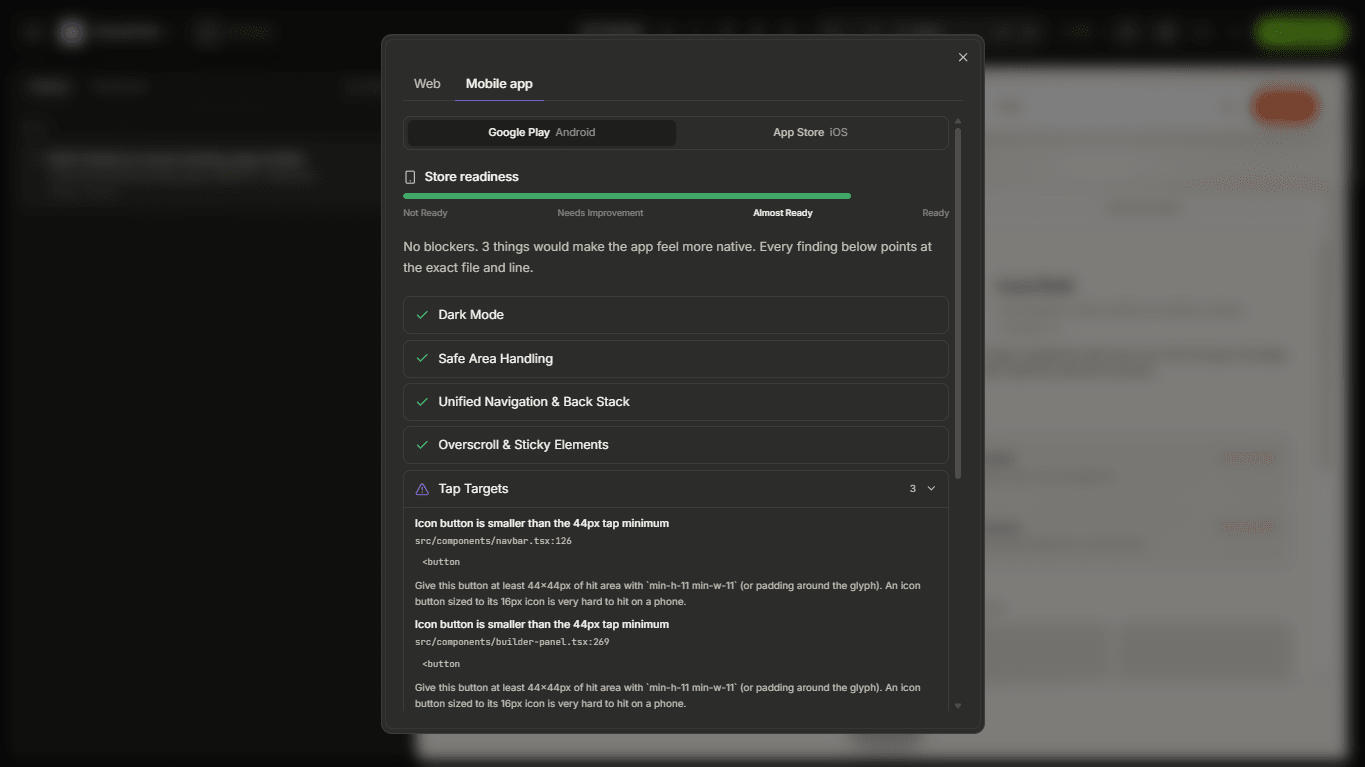
The purpose of the scan is to identify areas that may need attention before creating the mobile version.
Think of it as:
YOUR APPLICATION
       ↓
MOBILE READINESS SCAN
       ↓
   READY?
   ↙    ↘
 YES     ISSUES FOUND
  ↓           ↓
EXPORT      REVIEW
              ↓
             FIX
              ↓
           SCAN AGAIN
We'll cover the Mobile Readiness Scan in detail on the next page.
What Should Be Mobile-Ready?
Mobile readiness isn't only about making the interface narrower.
Your application needs to work well in a different usage environment.
Important areas may include:
- Navigation
- Touch interactions
- Forms
- Authentication
- Layouts
- Modals
- Tables
- Images
- File uploads
- Payments
- External links
- Responsive components
- Application workflows
The exact requirements depend on the application you're building.
Design for Touch
Desktop users have a mouse and keyboard.
Mobile users primarily interact with their fingers.
That means an interface like:
Tiny Button Tiny Button Tiny Button
may technically fit on a phone but still provide a poor mobile experience.
Buttons, menus, form controls, and other interactive elements should be easy to use with touch.
Think About Mobile Navigation
A desktop application might use a large sidebar:
┌─────────────┬──────────────────────┐
│ Dashboard   │                      │
│ Customers   │      CONTENT         │
│ Projects    │                      │
│ Analytics   │                      │
│ Settings    │                      │
└─────────────┴──────────────────────┘
On mobile, the same navigation may need to collapse into a menu or use another mobile-friendly pattern.
For example:
┌─────────────────────┐
│ ☰   Dashboard       │
├─────────────────────┤
│                     │
│      CONTENT        │
│                     │
└─────────────────────┘
The goal isn't simply to shrink the desktop interface.
It's to make the application comfortable to use on a smaller screen.
Mobile Forms
Forms deserve particular attention.
Suppose your application contains:
- Name
- Phone
- Company
- Address
- Country
- Message
On desktop, these fields may appear across multiple columns.
On mobile, a simpler vertical layout may provide a better experience.
Test:
- Input sizes
- Dropdowns
- Date pickers
- File uploads
- Validation messages
- Submit buttons
- Keyboard behavior
- Long forms
The entire form should remain usable on a smaller screen.
Mobile Dashboards
Dashboards can be particularly challenging because they're often designed around wide screens.
A desktop dashboard might have:
Revenue | Customers | MRR | Churn
across one row.
On mobile, those cards may need to stack:
Revenue

Customers

MRR

Churn
Tables, charts, filters, and sidebars may also require different behavior.
Tell condoo.Vibe what matters most to your mobile users.
For example:
Optimize the CRM dashboard for mobile. Keep all existing desktop functionality, but make the navigation, customer list, filters, actions, and analytics comfortable to use on smaller touch screens.
Android Export
For eligible plans, condoo.Vibe can prepare your application for Android distribution.
The Android workflow is generally:
condoo.Vibe PROJECT
     ↓
MOBILE READINESS
     ↓
ANDROID EXPORT
     ↓
TEST
     ↓
GOOGLE PLAY
We'll cover the Android export process on its own page.
iOS Export
condoo.Vibe also supports the path toward distributing eligible applications on iOS.
The workflow is similar:
condoo.Vibe PROJECT
     ↓
MOBILE READINESS
     ↓
iOS EXPORT
     ↓
TEST
     ↓
APP STORE
There is an important difference:
Publishing an iOS application requires your own Apple Developer account.
condoo.Vibe doesn't replace Apple's developer enrollment or App Store submission requirements.
Exporting Isn't the Same as Store Approval
This distinction is important.
condoo.Vibe can help you prepare the application for mobile distribution.
But the app stores control what is ultimately approved for their platforms.
For example:
condoo.Vibe
 ↓
Mobile Export
 ↓
Your App
 ↓
Store Submission
 ↓
Google / Apple Review
 ↓
Approved?
Google and Apple have their own:
- Developer requirements
- App policies
- Content policies
- Privacy requirements
- Metadata requirements
- Review processes
condoo.Vibe cannot guarantee that every submitted application will be approved by an app store.
You Own Your Store Presence
When publishing an application, your app-store presence belongs to your product or business.
For example:
Your Business
     ↓
Developer Account
     ↓
Your Application
     ↓
Your Store Listing
This is particularly important for agencies.
If you're building an app for a client, decide whose developer account will own and publish the application.
Mobile Export for Agencies
Mobile Export can be especially useful for agencies building products for clients.
For example:
CLIENT IDEA
     ↓
BUILD WITH condoo.Vibe
     ↓
WEB APPLICATION
     ↓
CLIENT APPROVAL
     ↓
MOBILE READINESS
     ↓
ANDROID / iOS
     ↓
CLIENT'S CUSTOM APP
You can potentially deliver both:
- Web application
and:
- Mobile application
from the same underlying product workflow.
Example: Booking Application
Suppose you build a booking platform for a fitness studio.
The web application allows customers to:
- Create an account
- View classes
- Book sessions
- Manage memberships
- View upcoming bookings
Once the web experience is working, you can prepare it for mobile.
The customer's journey becomes:
Open App
   ↓
Sign In
   ↓
Browse Classes
   ↓
Book
   ↓
View Upcoming Sessions
The core product remains familiar across platforms.
Example: Client Portal
An agency could build a client portal where customers:
- View projects
- Check progress
- Review deliverables
- Download files
- Send messages
- Approve work
Then prepare the same product for mobile distribution.
Instead of customers always opening:
portal.agency.com
they could also access the product through an installed mobile application.
Example: SaaS Product
Imagine you've built a SaaS application with:
- Authentication
- Dashboard
- Projects
- Team Members
- Billing
- Notifications
- AI Features
Your product could begin on the web.
Once you validate it and understand how customers use it, you can prepare the experience for mobile.
This allows you to follow a practical path:
BUILD
 ↓
LAUNCH WEB
 ↓
GET USERS
 ↓
LEARN
 ↓
IMPROVE
 ↓
PREPARE MOBILE
 ↓
LAUNCH MOBILE
You don't necessarily need to launch everywhere on day one.
Web First Can Be a Good Strategy
Just because Mobile Export exists doesn't mean every project needs a mobile app immediately.
For many products, launching the web version first can help you:
- Validate the idea
- Get customer feedback
- Fix workflows
- Understand usage
- Improve the product
- Avoid unnecessary complexity
Then, when the product is ready, you can expand to mobile.
Keep Mobile Users in Mind While Building
If you already know your application will eventually become a mobile app, tell condoo.Vibe early.
For example:
Build this application as a responsive web application that we plan to export to Android and iOS later. Make all primary workflows mobile-friendly and touch-friendly from the beginning.
This can reduce the amount of adaptation needed later.
Mobile and Your Backend
Your mobile application may still depend on the same underlying application functionality.
For example:
              DATABASE
                 ↑
                 │
WEB APP ← APPLICATION → MOBILE APP
Users should generally expect the same account and application data across experiences when the product is designed that way.
For example, a customer who creates a project on the web should be able to see that project from the mobile experience.
Authentication
Before exporting, test authentication carefully on mobile.
Test:
- Signup
- Login
- Logout
- Protected screens
- Google authentication, where applicable
- Session persistence
- Password flows
- User roles
Authentication that works in a desktop browser should still be validated in the exported mobile experience.
External Integrations
If your project uses connectors, test them in the mobile experience as well.
For example:
- Stripe
- Resend
- Twilio
- Cloudinary
- Google services
- AI providers
- Calendly
A workflow working correctly on the web doesn't mean you should skip testing it in the mobile version.
Payments on Mobile
Payments can require additional consideration when applications are distributed through app stores.
The type of product, what you're selling, and where the purchase occurs can affect which platform rules apply.
Don't assume that a web payment implementation can always be used unchanged inside a store-distributed application.
Mobile Doesn't Replace Your Web App
Exporting your project for mobile doesn't mean you have to stop offering the web version.
You may have:
             YOUR PRODUCT
            ↙            ↘
         WEB             MOBILE
          ↓              ↙   ↘
yourdomain.com      Android   iOS
Different users can choose the experience that works best for them.
Before Mobile Export
A good checklist is:
- Core application works
- Mobile layouts are responsive
- Navigation works on small screens
- Buttons are touch-friendly
- Forms work on mobile
- Authentication works
- Database workflows work
- Integrations work
- Important dialogs fit
- Tables are usable
- Images display correctly
- No unexpected horizontal scrolling
- Critical workflows are tested
Then run the Mobile Readiness Scan.
The Mobile Export Journey
The complete workflow is:
BUILD WITH condoo.Vibe
       ↓
WORKING WEB APP
       ↓
MOBILE OPTIMIZATION
       ↓
MOBILE READINESS SCAN
       ↓
FIX ISSUES
       ↓
EXPORT
     ↙     ↘
ANDROID   iOS
   ↓       ↓
 TEST     TEST
   ↓       ↓
STORE SUBMISSION
condoo.Vibe helps take your product from idea to application, and for eligible projects, beyond the browser.
Next: Mobile Readiness Scan
Before generating a mobile build, you need to know whether your application is ready.
On the next page, we'll cover Mobile Readiness Scan, including:
- What condoo.Vibe checks
- How to run a scan
- Understanding readiness issues
- Fixing mobile problems
- Re-running the scan
- Preparing for Android and iOS export