 condoo.Vibe
Export for Android (APK)
Build an Android APK from your condoo.Vibe project or download the mobile source files. Test the build before moving toward Google Play.
Once your application has passed condoo.Vibe's Mobile Readiness Scan, you can turn it into an Android application.
condoo.Vibe handles the build process for you.
You don't need to manually configure an Android project, set up the application package, or prepare the mobile source code yourself before generating the build.
Once condoo.Vibe determines that your project is mobile-ready, you can either:
- Build the Android app
- Download the mobile source files
Scan. Build. Download. Your condoo.Vibe project is ready to move beyond the browser.
Before You Export
Your application should first complete the Mobile Readiness Scan.
The workflow is:
condoo.Vibe PROJECT
     ↓
MOBILE READINESS SCAN
     ↓
READY?
  ↙       ↘
NO         YES
↓           ↓
FIX       BUILD APP
ISSUES       OR
          DOWNLOAD
           SOURCE
If condoo.Vibe identifies readiness issues, resolve them before moving forward.
Once your project is determined to be ready, the mobile build and source export options become the next step.
Your Mobile App Is Ready
When condoo.Vibe determines that your application is ready for mobile, you'll be able to proceed with the mobile export.
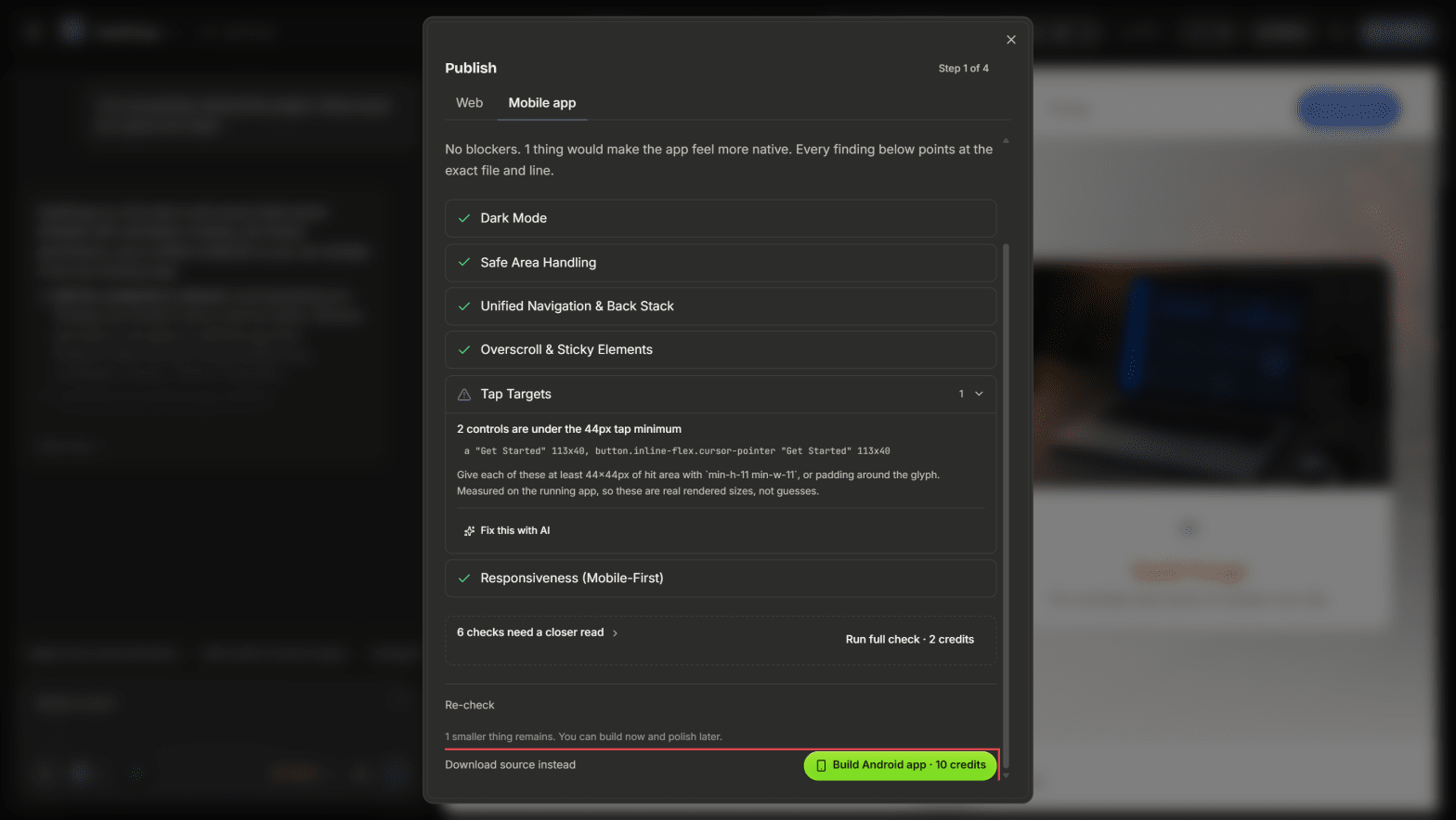
From here, you have two paths:
              MOBILE READY
                   ↓
            CHOOSE YOUR PATH
              ↙          ↘
        BUILD APP       SOURCE FILES
            ↓               ↓
           APK           DOWNLOAD
Which option you choose depends on what you want to do next.
Option 1: Build the Android App
If you want condoo.Vibe to create the Android application for you, choose the option to Build App.
condoo.Vibe takes the mobile-ready project and starts the Android build process.
MOBILE-READY PROJECT
        ↓
    BUILD APP
        ↓
 condoo.Vibe BUILDS APP
        ↓
   ANDROID BUILD
        ↓
     DOWNLOAD
You don't need to manually create the Android project before doing this.
condoo.Vibe handles the build process.
Build Your APK
Start the Android build from the Mobile Export interface.
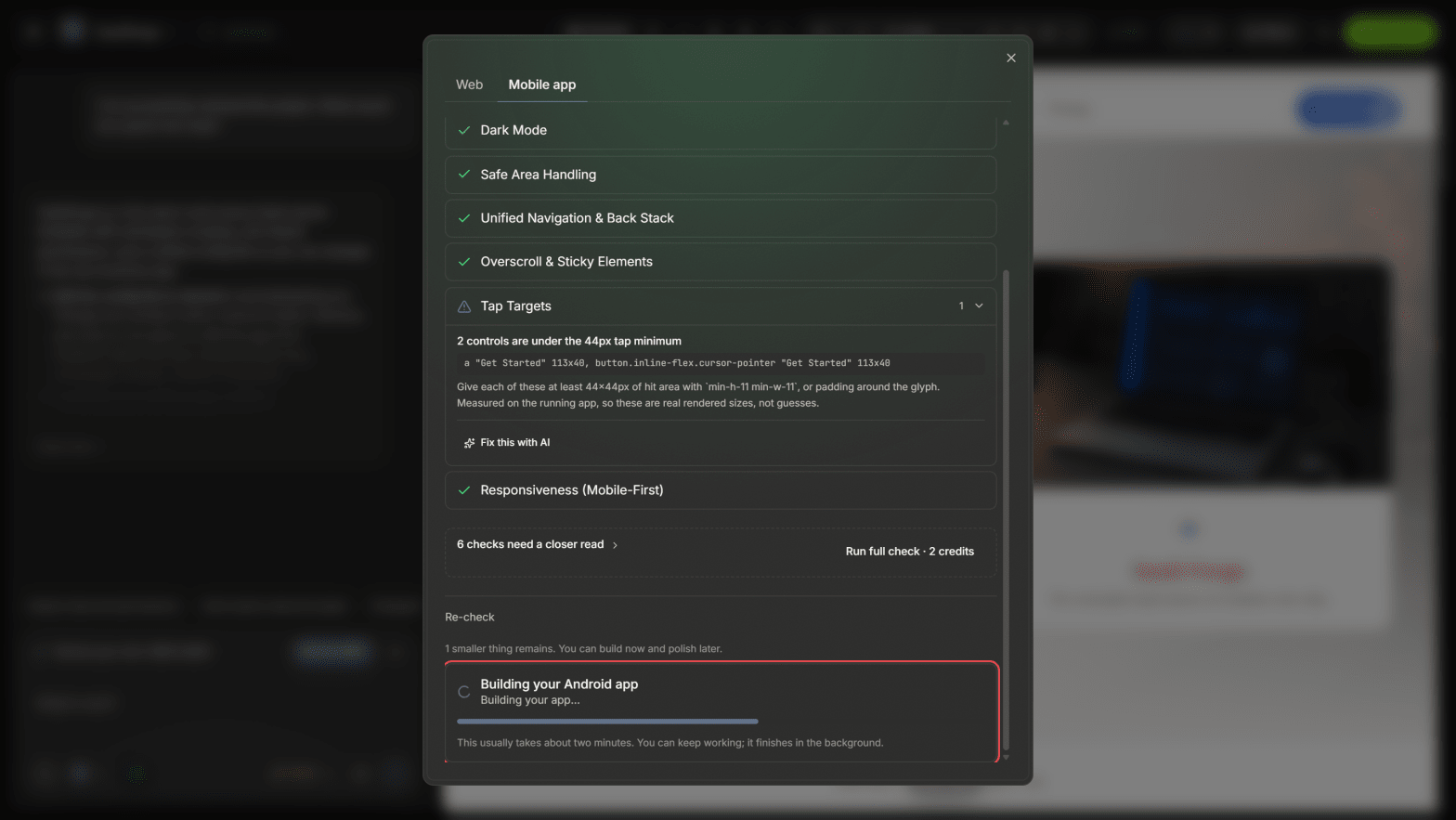
condoo.Vibe will begin preparing the Android version of your application.
Depending on the project, the build may take some time to complete.
Wait for the current build to finish before starting another one.
When Your Android Build Is Ready
Once the build completes successfully, condoo.Vibe makes the generated Android application available for download.
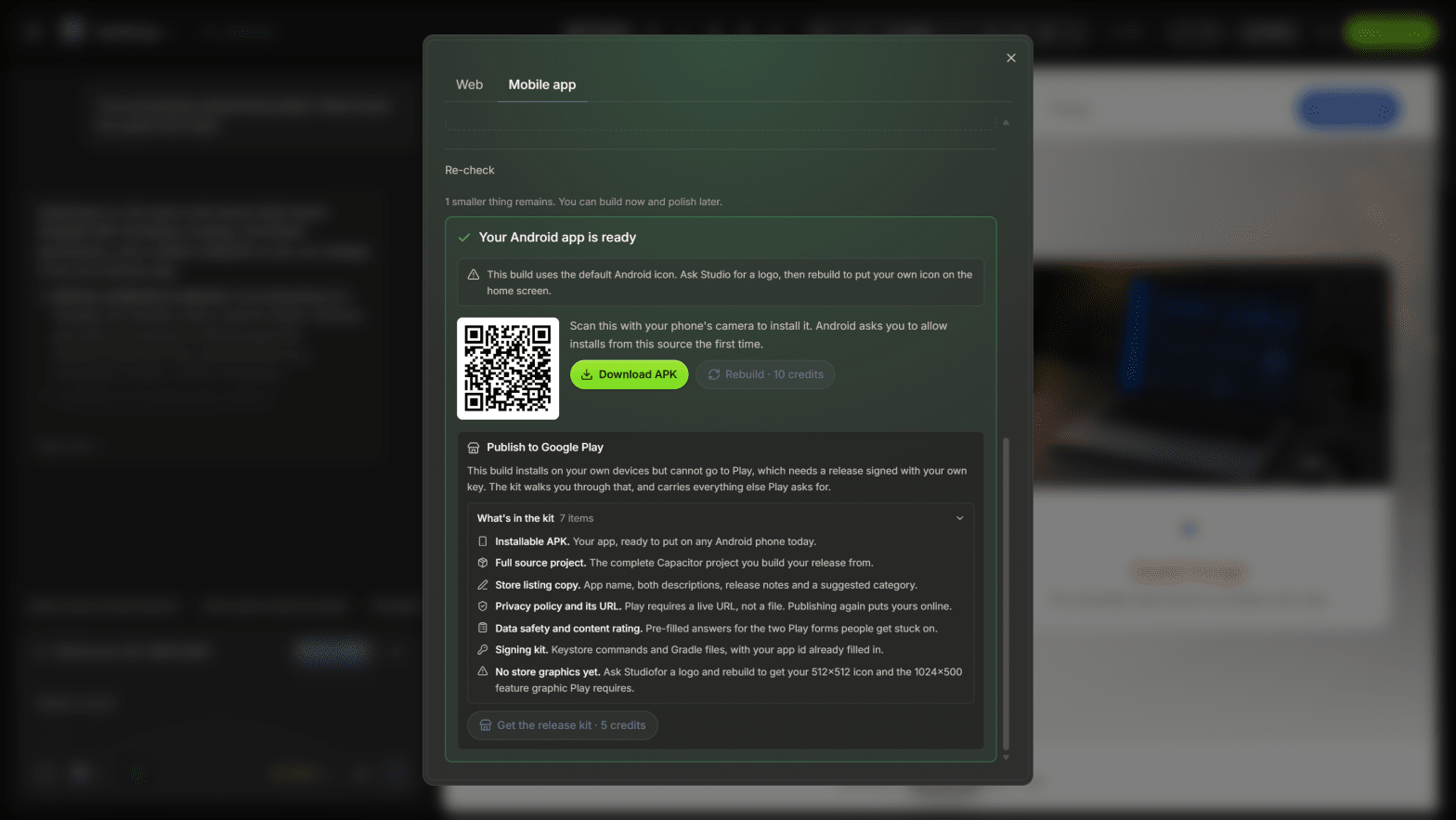
You can then download the APK and test it on an Android device.
Your workflow becomes:
condoo.Vibe
 ↓
MOBILE READINESS
 ↓
BUILD APP
 ↓
APK
 ↓
DOWNLOAD
 ↓
TEST
What Is an APK?
APK stands for Android Package Kit.
It's an Android application package that can be installed on compatible Android devices.
Your generated APK can be used to test the mobile version of your condoo.Vibe application before moving toward public distribution.
Install and Test Your App
Generating the APK isn't the end of the process.
Install the application on an Android device and test it.
Don't only check whether the app opens.
Test the actual workflows your users depend on.
For example, if you've built a booking application:
Open App
   ↓
Create Account
   ↓
Sign In
   ↓
Browse Services
   ↓
Make Booking
   ↓
Receive Confirmation
   ↓
Manage Booking
If all of those actions are important to the product, test all of them.
What Should You Test?
Pay particular attention to:
- Authentication
- Navigation
- Forms
- Database functionality
- Buttons and touch interactions
- File uploads
- Images
- External links
- Integrations
- Payments, where applicable
- Important customer workflows
- Mobile layouts
Also close the application and reopen it to make sure the experience behaves as expected.
Your Web and Mobile Apps Can Work Together
For applications designed around the same backend and user accounts, your web and mobile experiences can be part of the same product.
For example:
                 YOUR PRODUCT
                ↙            ↘
             WEB            ANDROID
              ↓                ↓
            USERS            USERS
                ↘            ↙
                 APPLICATION
                      ↓
                    DATA
A user could interact with the product from the web and later continue from the mobile application.
The exact behavior depends on how you've designed your application.
Option 2: Download the Source Files
You don't have to use condoo.Vibe's generated mobile build as your only path.
Once your project is mobile-ready, you can also download the mobile source files.
MOBILE-READY PROJECT
        ↓
DOWNLOAD SOURCE
        ↓
MOBILE SOURCE FILES
        ↓
YOUR DEVELOPMENT WORKFLOW
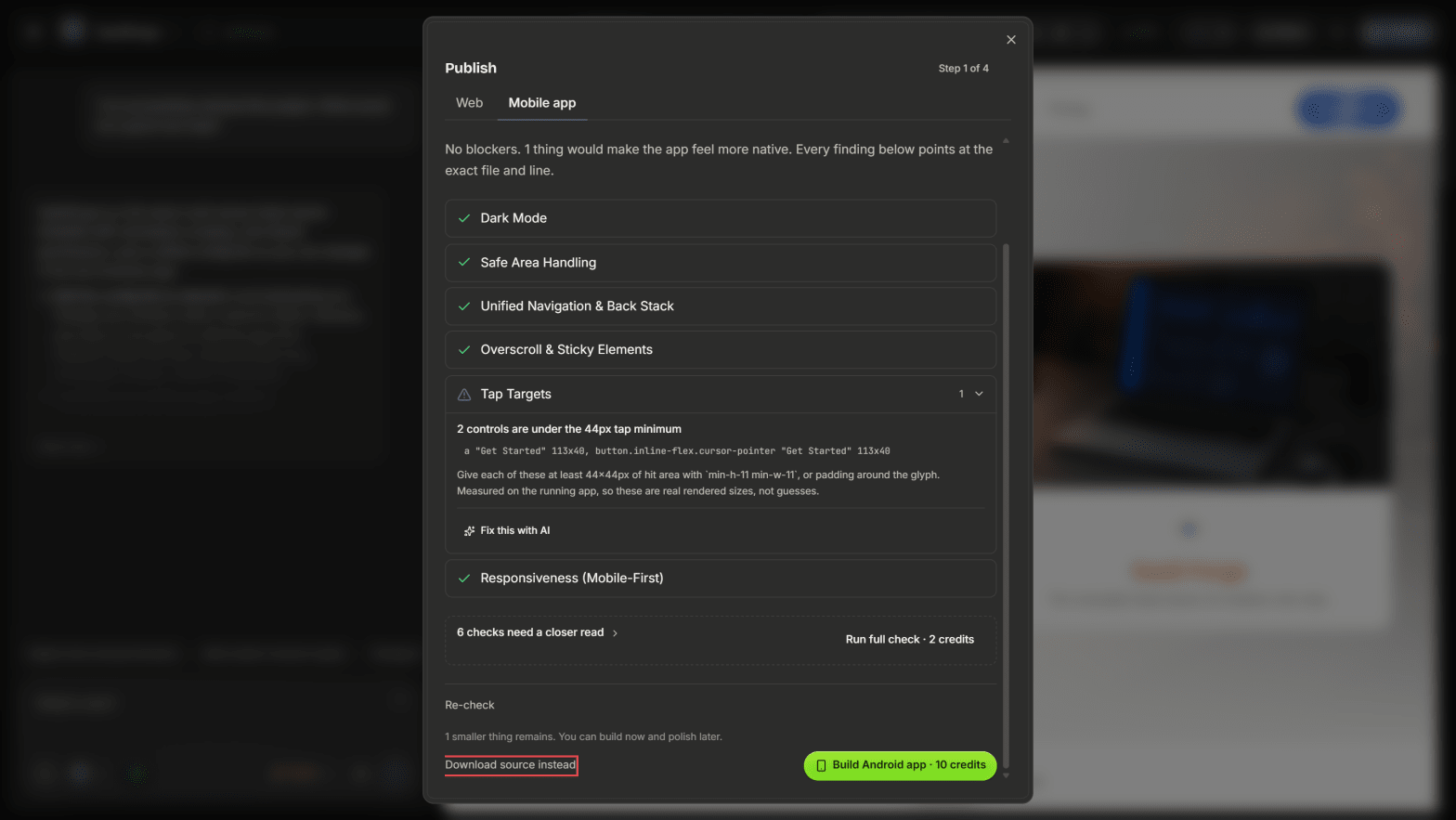
This gives developers and agencies more flexibility over what happens next.
Why Download the Source?
Downloading the source can be useful when you want greater control over the mobile application.
For example, you may want to:
- Continue development outside condoo.Vibe
- Review the generated mobile code
- Make custom changes
- Use your own development workflow
- Build the application yourself
- Hand the project to a developer
- Maintain your own mobile build process
This makes condoo.Vibe useful both for users who want the simplest path and technical teams that want more control.
Build vs Download Source
The choice is straightforward.
Build App
Choose this when you want condoo.Vibe to generate the Android build for you.
condoo.Vibe
 ↓
BUILD
 ↓
APK
 ↓
DOWNLOAD
Download Source
Choose this when you want access to the mobile project files.
condoo.Vibe
 ↓
SOURCE
 ↓
DOWNLOAD
 ↓
YOUR WORKFLOW
Neither approach changes the application you've already built in condoo.Vibe.
It's simply a choice about how you want to continue with the mobile version.
For Agencies
This is particularly useful when you're building applications for clients.
You might use condoo.Vibe to handle the entire build:
CLIENT PROJECT
      ↓
BUILD WITH condoo.Vibe
      ↓
MOBILE READINESS
      ↓
BUILD ANDROID APP
      ↓
TEST
      ↓
DELIVER / PUBLISH
Or your development team may prefer:
CLIENT PROJECT
      ↓
BUILD WITH condoo.Vibe
      ↓
MOBILE READINESS
      ↓
DOWNLOAD SOURCE
      ↓
DEVELOPMENT TEAM
      ↓
CUSTOM WORK / BUILD
This gives agencies flexibility depending on the requirements of each client.
Fixing Problems Found After Export
Even after passing the readiness scan, you should test the actual generated Android application.
If you find a problem, return to the condoo.Vibe project and describe exactly what happened.
For example:
The application passed the Mobile Readiness Scan, but in the Android build the bottom navigation covers the Save button on the profile screen. Fix the mobile layout without changing the desktop version.
Then follow the process again:
ISSUE FOUND
    ↓
FIX IN condoo.Vibe
    ↓
MOBILE READINESS
    ↓
BUILD AGAIN
    ↓
DOWNLOAD
    ↓
TEST
Your application can continue evolving.
If the Build Fails
If condoo.Vibe can't successfully generate the Android build, check any error information provided.
When asking condoo.Vibe to investigate, provide the context.
For example:
Expected: The mobile-ready project should generate an Android build.
Mobile Readiness: Passed
Actual: The Android build starts but fails before the APK is generated.
Error: [PASTE ERROR]
Debug the Android build issue without changing unrelated application functionality.
Specific information makes troubleshooting easier.
Updating Your Android App
Your first mobile build doesn't have to be your last.
Your application might evolve from:
Version 1
Core Product

    ↓

Version 2
New Features

    ↓

Version 3
Improved Experience
When you've made significant changes, you can repeat the mobile workflow:
UPDATE PROJECT
      ↓
TEST
      ↓
MOBILE READINESS
      ↓
BUILD
      ↓
DOWNLOAD
      ↓
TEST NEW VERSION
This allows your mobile application to evolve alongside your condoo.Vibe project.
Build Once, Keep Improving
Mobile export is part of condoo.Vibe's broader product-development workflow.
You aren't creating a disposable mobile version.
You can continue:
BUILD
 ↓
SCAN
 ↓
EXPORT
 ↓
TEST
 ↓
LEARN
 ↓
IMPROVE
 ↓
EXPORT AGAIN
Your product can continue evolving across web and mobile.
APK Export vs Play Store Publishing
Generating your Android application and publishing it on Google Play are separate steps.
condoo.Vibe gets you to:
condoo.Vibe PROJECT
      ↓
MOBILE READY
      ↓
BUILD
      ↓
ANDROID APP
Store distribution then involves:
ANDROID APP
      ↓
GOOGLE PLAY
      ↓
REVIEW
      ↓
PUBLIC RELEASE
Google controls the Play Store submission and approval process.
Before Moving to Google Play
Before submitting your application, make sure you've tested the generated build.
Check:
- App installs successfully
- App opens successfully
- Authentication works
- Navigation works
- Forms work
- Database functionality works
- Integrations work
- Mobile layouts work
- Important workflows work
- External links work
- No test content remains
- No sensitive credentials are exposed
Your goal should be to submit a product you've already tested, not use the Play Store review process as your testing environment.
Android Export Workflow
The complete condoo.Vibe Android workflow is:
BUILD YOUR APPLICATION
        ↓
TEST
        ↓
MOBILE READINESS SCAN
        ↓
READY
        ↓
CHOOSE
   ↙           ↘
BUILD APP    DOWNLOAD SOURCE
   ↓               ↓
  APK        SOURCE FILES
   ↓               ↓
DOWNLOAD      YOUR WORKFLOW
   ↓
 TEST
   ↓
PLAY STORE
condoo.Vibe removes much of the complexity between having a working web application and having an Android build you can take forward.
Next: Submitting to the Play Store
The next page is Submitting to the Play Store.
That's where we'll cover the things that condoo.Vibe doesn't need during the build, but Google may require during store submission, such as:
- Google Play Developer account
- Creating the app in Play Console
- App name and store listing
- App icon
- Screenshots
- App description
- Privacy policy
- Data safety information
- Testing requirements
- Uploading the Android release
- Review and approval
- Publishing updates
That separation is much cleaner:
condoo.Vibe builds the app first. Google Play asks for the store/distribution information later.