 condoo.Vibe
Client Sharing & Review
Share condoo.Vibe projects with clients for review and approval. Collect feedback, iterate, and get sign-off without giving them editing access.
When you're building applications for clients, the client usually doesn't need to participate in the actual development process.
They need something simpler:
See the work. Review it. Give feedback. Approve it.
condoo.Vibe's client sharing and review workflow helps agencies involve clients in the project without giving them unnecessary control over the building process.
Build with condoo.Vibe. Share with your client. Collect feedback. Make changes. Get approval.
A Better Client Review Workflow
Traditional client development can quickly become messy.
You build something.
Then send screenshots.
The client replies by email.
Then sends another message on WhatsApp.
Someone else adds feedback in Slack.
Another stakeholder sends a document.
Soon, feedback is spread across several different places.
A better workflow is:
BUILD
  ↓
SHARE
  ↓
CLIENT REVIEWS
  ↓
FEEDBACK
  ↓
REVISE
  ↓
APPROVE
  ↓
PUBLISH
condoo.Vibe helps keep the product itself at the center of that process.
Share the Actual Experience
Screenshots are useful, but they don't always show how an application actually feels.
A client may need to:
- Navigate between pages
- Open menus
- Complete forms
- Test interactions
- Review mobile layouts
- Follow important workflows
- See how different screens connect
Giving them access to a reviewable version provides much more context than sending static screenshots.
Share Your Project for Review
When your project reaches a stage where you'd like client feedback, use condoo.Vibe's sharing and review functionality to give the client access to the appropriate project experience.
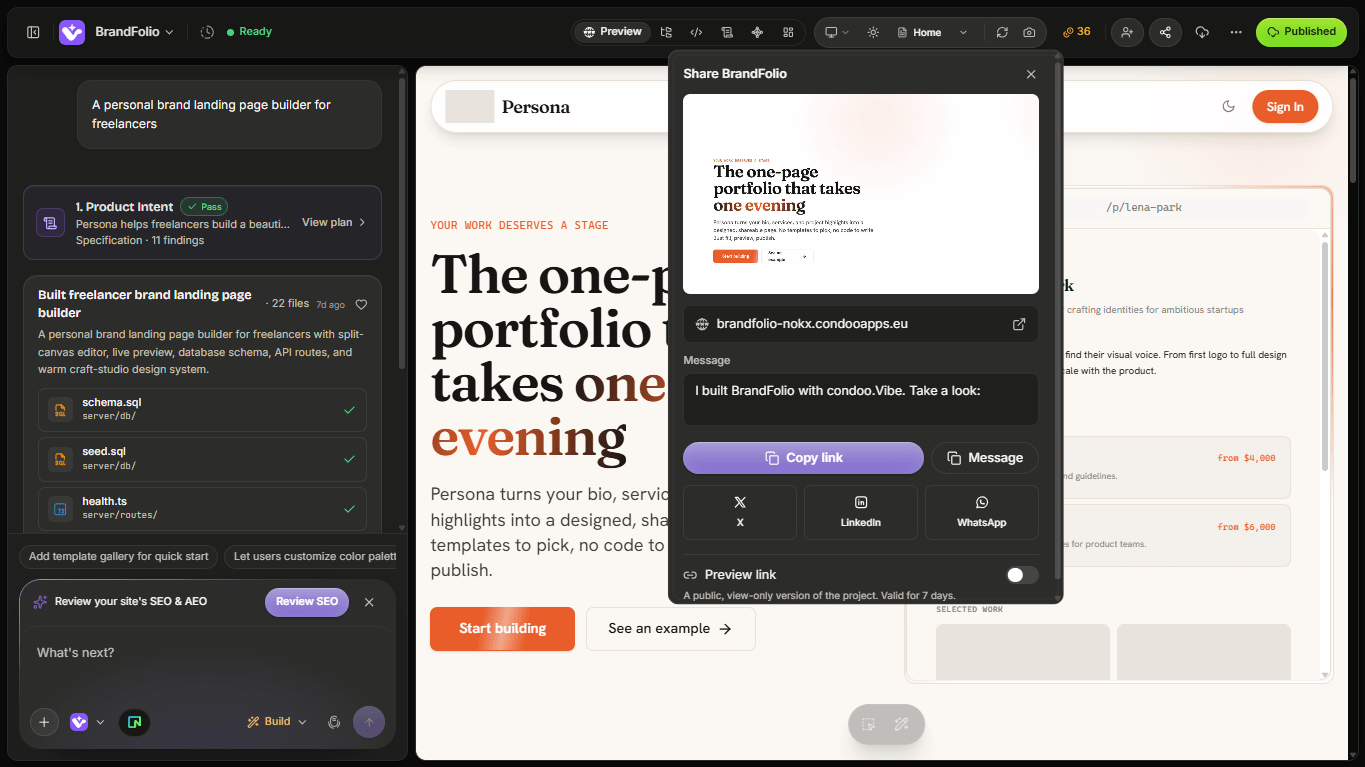
The goal is to allow your client to review the work without turning them into a member of your development team.
Review Before Publishing
You don't have to publish every change before a client can evaluate your work.
A useful agency workflow is:
condoo.Vibe
 ↓
BUILD
 ↓
PREVIEW
 ↓
CLIENT REVIEW
 ↓
CHANGES
 ↓
CLIENT APPROVAL
 ↓
PUBLISH
This is particularly valuable when you're making substantial changes to a client's application.
What Should Clients Review?
Don't simply send the project and say:
Let me know what you think.
Give the client some direction.
For example:
We've completed the new booking experience. Please review the homepage, service selection, booking flow, confirmation screen, and mobile experience.
This focuses their attention on the work you've actually completed.
Review by Milestone
For larger projects, don't wait until the entire application is finished before asking for feedback.
Break the project into milestones.
For example:
MILESTONE 1
Brand + Homepage
      ↓
CLIENT REVIEW
      ↓
APPROVED

MILESTONE 2
Dashboard + Authentication
      ↓
CLIENT REVIEW
      ↓
APPROVED

MILESTONE 3
Booking System
      ↓
CLIENT REVIEW
      ↓
APPROVED

MILESTONE 4
Final Application
This makes feedback easier to manage and reduces the chance of major surprises near the end of the project.
Example: Website Project
Suppose your agency is building a website for a law firm.
The first version contains:
- Homepage
- About
- Practice areas
- Attorneys
- Contact
- Consultation form
You can share the project and ask the client to review specific areas.
For example:
Please review the homepage messaging, attorney profiles, practice-area content, and consultation flow.
The client can focus on business accuracy while you handle implementation.
Example: SaaS Application
For a more complex application, review can happen in stages.
Suppose you're building:
- Authentication
- Dashboard
- Customers
- Projects
- Payments
- Reports
- Settings
Instead of waiting until everything is finished:
Dashboard
   ↓
Review

Customers + Projects
   ↓
Review

Payments
   ↓
Review

Complete Product
   ↓
Final Review
This gives you opportunities to correct direction before too much work is built on top of it.
Example: Booking Application
Imagine you're building an application for a fitness studio.
Ask the client to test the actual customer journey:
Open App
   ↓
Choose Class
   ↓
Select Time
   ↓
Book
   ↓
Confirmation
   ↓
Manage Booking
A page can look perfect while the overall workflow still needs improvement.
Client review should therefore include both design and functionality.
Client Feedback
Once the client reviews the project, they can identify changes they'd like made.
Feedback might include:
- Change the homepage headline.
- Make the booking button more prominent.
- Add another service category.
- Move testimonials above pricing.
- Customers should be able to reschedule appointments.
Some requests are simple visual changes.
Others may introduce entirely new functionality.
Treat them differently.
Turn Feedback Into Clear condoo.Vibe Requests
Client feedback isn't always written like a development specification.
A client might say:
The dashboard feels too busy.
Before immediately asking condoo.Vibe to redesign everything, translate that into something more specific.
For example:
Simplify the dashboard hierarchy. Keep all existing functionality, but make the four primary metrics more prominent, reduce unnecessary visual density, and move secondary information lower on the page.
condoo.Vibe can then work from a clearer instruction.
Don't Automatically Implement Every Request
Sometimes a client request can affect other parts of the application.
For example:
Remove the customer account requirement.
That could affect:
- Authentication
- Bookings
- Payments
- Customer history
- Saved information
- Permissions
For significant requests, use Plan Mode first.
For example:
The client wants customers to book without creating an account. Analyze how this would affect the existing booking, payment, customer history, and authentication workflows. Create a plan only. Don't make changes yet.
Then review the implications before building.
Feedback → Build → Review
Client development is usually iterative.
CLIENT FEEDBACK
      ↓
condoo.Vibe
      ↓
CHANGES
      ↓
PREVIEW
      ↓
INTERNAL REVIEW
      ↓
CLIENT REVIEW
      ↓
APPROVED?
   ↙       ↘
 NO         YES
 ↓           ↓
REVISE     PUBLISH
This cycle can happen several times during a project.
That's normal.
Review Changes Before Sending Them Back
When condoo.Vibe completes a requested change, review it yourself before sending the project back to your client.
Check:
- Did condoo.Vibe implement the request correctly?
- Did anything else change unexpectedly?
- Does the feature work?
- Does it work on mobile?
- Did existing functionality remain intact?
Your client shouldn't become your first QA tester.
Separate Feedback From Approval
Feedback and approval are different stages.
A client saying:
This looks much better.
doesn't necessarily mean:
This version is approved for production.
For important projects, make the approval point explicit.
Your workflow could be:
REVIEW
  ↓
FEEDBACK
  ↓
REVISIONS
  ↓
FINAL REVIEW
  ↓
APPROVAL
  ↓
PUBLISH
This is especially useful for agencies working with multiple stakeholders.
Multiple Client Stakeholders
Sometimes you're not working with one client contact.
You might have:
- Business Owner
- Marketing Manager
- Operations Manager
- Technical Lead
Try to establish who has final approval.
Otherwise:
Person A → Change X

Person B → Undo X

Person C → Change X Again
can create unnecessary revision cycles.
Your agency process should define who provides feedback and who makes the final decision.
Protect the Building Environment
Clients generally don't need the same access as the people actively building the application.
Your development team may need to:
- Prompt condoo.Vibe
- Modify functionality
- Debug
- Change application structure
- Work with integrations
A client primarily needs to:
VIEW
 ↓
TEST
 ↓
COMMENT
 ↓
APPROVE
Keeping those responsibilities separate helps prevent accidental changes.
Client Review for Live Applications
Client review remains useful even after an application has launched.
Suppose the client requests:
Add a customer loyalty program.
The application is already being used by customers.
Instead of building and immediately publishing:
LIVE APP
   ↓
BUILD NEW FEATURE
   ↓
PREVIEW
   ↓
INTERNAL TEST
   ↓
CLIENT REVIEW
   ↓
APPROVAL
   ↓
PUBLISH UPDATE
This gives both your agency and the client an opportunity to verify the change before it reaches users.
Keep Production Stable
When working on an existing client application, remember that the live version may contain:
- Real customers
- Real payments
- Real bookings
- Business data
- Active integrations
Don't treat production as your review environment.
Build, preview, test, review, and then publish.
Client Review for Mobile Apps
If you're preparing an Android or iOS application for a client, involve them before final export.
For example:
WEB APP
 ↓
CLIENT REVIEW
 ↓
MOBILE OPTIMIZATION
 ↓
MOBILE READINESS
 ↓
MOBILE REVIEW
 ↓
EXPORT
Ask them to review the important mobile workflows rather than only the visual design.
Client Ownership
For agency projects, establish ownership early.
Clarify things such as:
- Who owns the project?
- Who owns the domain?
- Who manages integrations?
- Who owns external service accounts?
- Who owns mobile developer accounts?
- Who manages the application after delivery?
This becomes increasingly important as you build larger applications for clients.
A Strong Agency Workflow
A good end-to-end condoo.Vibe agency process might look like:
CLIENT IDEA
     ↓
DISCOVERY
     ↓
PLAN WITH condoo.Vibe
     ↓
BUILD
     ↓
INTERNAL REVIEW
     ↓
CLIENT REVIEW
     ↓
FEEDBACK
     ↓
REVISE
     ↓
CLIENT APPROVAL
     ↓
PUBLISH
     ↓
CONTINUE IMPROVING
condoo.Vibe accelerates the building process, while your agency remains responsible for managing the client relationship and delivering the right product.
condoo.Vibe as Your Agency Product Team
For an agency, condoo.Vibe can sit between the client's requirements and the finished product.
CLIENT
   ↓
YOUR AGENCY
   ↓
condoo.Vibe
   ↓
BUILD
   ↓
YOUR AGENCY REVIEWS
   ↓
CLIENT REVIEWS
   ↓
LAUNCH
You remain in control of strategy, client communication, and approval.
condoo.Vibe helps accelerate the product-development work behind it.
Next: Commenting on a Preview
The final page in Teams & Collaboration is Commenting on a Preview.
That's where we'll get more specific about the feedback mechanism itself:
- Reviewing the preview
- Leaving comments
- Commenting on specific areas
- Writing useful feedback
- Reviewing client comments
- Turning comments into changes
- Resolving feedback
- Running another review round