 condoo.Vibe
Plan Mode
Use Plan Mode to have condoo.Vibe design a structured specification you can review and refine before any code is written.
Plan Mode lets condoo.Vibe think through your product or feature before making changes to your application.
Instead of immediately implementing your request, condoo.Vibe analyzes what you're trying to accomplish and creates a structured plan for how it should be built.
This is especially useful for complex applications, major features, architectural changes, or anything you want to review before implementation begins.
Plan first. Review the approach. Then build with confidence.
When to use Plan Mode
You don't need Plan Mode for every request.
A simple change like:
Change the primary button from blue to green.
can usually go directly to Build Mode.
But consider a request like:
Add a complete team workspace system. Users should be able to create workspaces, invite team members, assign roles, switch between workspaces, and keep each workspace's data separate.
That change can affect:
- Authentication
- Database structure
- Permissions
- Navigation
- Application logic
- Existing data
- Multiple pages and components
This is a good candidate for Plan Mode.
Plan Mode works particularly well for:
- New SaaS applications
- Complex features
- Authentication systems
- Databases and data models
- User roles and permissions
- Payment systems
- Multi-step workflows
- Major redesigns
- Large changes to an existing application
- Features involving several integrations
Starting a plan
Select Plan from the mode selector before submitting your prompt.
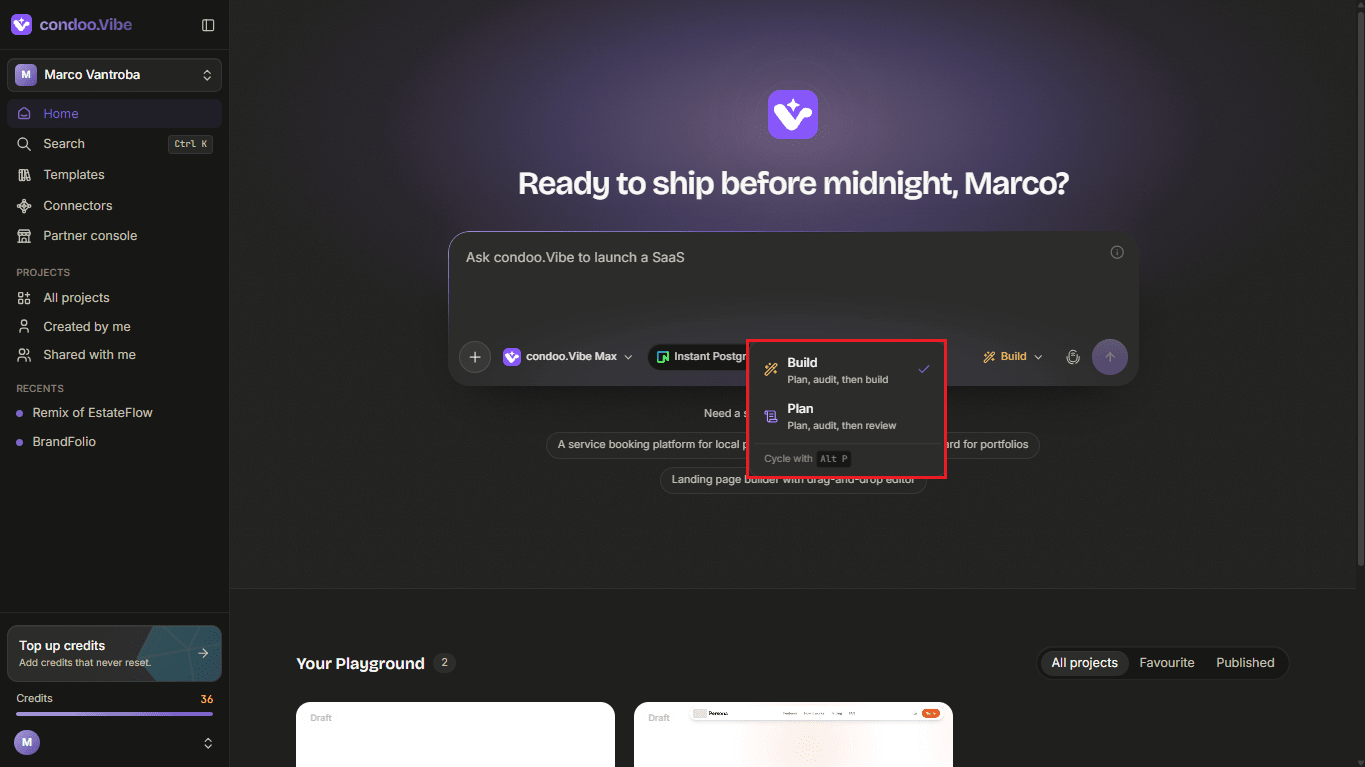
Then describe what you want to accomplish.
For example:
Build a CRM for a real estate agency. Agents should be able to manage leads, properties, deals, and follow-ups. Include team workspaces with Owner, Admin, and Agent roles. Each workspace's data must remain separate.
condoo.Vibe will analyze the request before implementation.
condoo.Vibe turns your idea into a specification
Plan Mode goes beyond simply rewriting your prompt.
condoo.Vibe thinks through the different parts required to make the product work.
For a complex application, the resulting plan can cover areas such as:
- Product goals
- User requirements
- Pages and routes
- User experience
- Design direction
- Data models
- Application functionality
- Authentication and permissions
- API behavior
- Integrations
- Implementation tasks
The exact plan depends on what you're building.
Understanding your condoo.Vibe plan
condoo.Vibe organizes complex plans into structured sections.
Product Intent
Product Intent defines what you're building, who it's for, and what the product is supposed to accomplish.
For example:
EstateFlow is a CRM for real estate agencies. It helps brokerage owners and agents manage leads, properties, deals, follow-ups, and team activity from one workspace.
This gives the rest of the build a clear direction.
Requirements
Requirements describe what users should be able to do and how the application should behave.
For example:
When an agent creates a lead, the system should save the lead's contact information, status, assigned agent, budget, property interest, and notes.
Good requirements help turn a broad product idea into specific functionality.
Experience and Design
This section describes how the application should look and behave from the user's perspective.
It can include:
- Visual direction
- Layout
- Navigation
- Responsive behavior
- Typography
- Colors
- Important UI states
- Page structure
This helps condoo.Vibe think about the application as a product experience rather than only a collection of features.
Data and Functionality
For applications that store information or contain dynamic features, condoo.Vibe can plan the underlying functionality.
This may include:
- Data entities
- Relationships
- Authentication
- Permissions
- API behavior
- Application state
- Integrations
- Business rules
For example, a CRM might require relationships between:
Lead → Deal → Property → Agent
Planning these relationships before implementation can help avoid problems later.
Implementation Tasks
condoo.Vibe can break the approved specification into implementation tasks.
These tasks give the build process a structured path from the specification to the working application.
condoo.Vibe reviews the plan
condoo.Vibe can also inspect the proposed plan for issues before implementation.
This is where the planning process becomes particularly useful.
A plan might initially overlook something important, such as:
- Missing authentication checks
- Undefined user permissions
- Incomplete mobile behavior
- Missing error states
- Unclear data relationships
- Inconsistent design rules
- Missing API behavior
condoo.Vibe can identify concerns and refine the specification before the build begins.
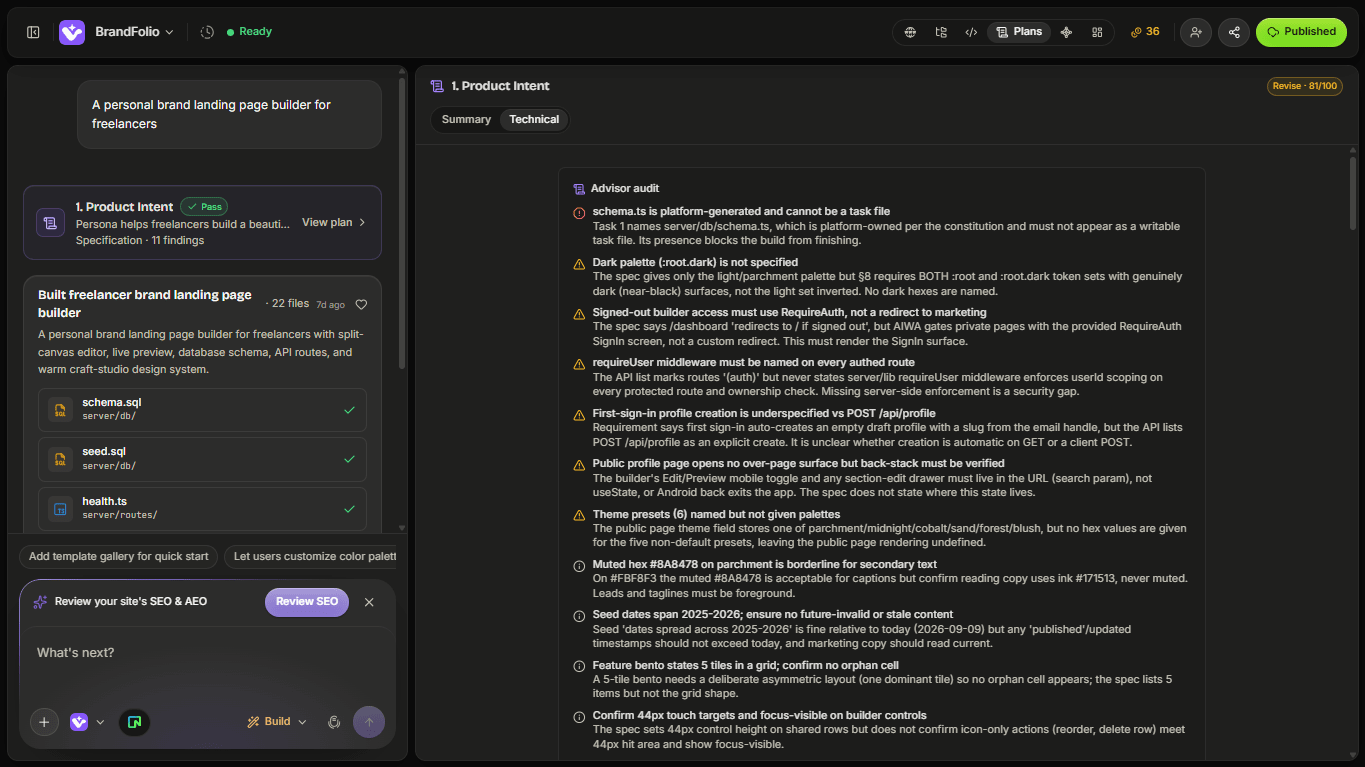
Think of this as an internal product and engineering review.
Instead of discovering every issue after implementation, condoo.Vibe can reason through many of the requirements beforehand.
Review the plan yourself
condoo.Vibe's plan is not something you have to accept blindly.
Read through it before building.
Ask yourself:
Does it understand the product?
Check that the Product Intent accurately describes what you're trying to create.
Are the important features included?
Look through the requirements and make sure nothing essential is missing.
Are the user roles correct?
If your application has customers, admins, team members, vendors, or other roles, verify what each one should be able to do.
Does the data model make sense?
Check that the information your application needs to store is represented.
Is anything being overbuilt?
condoo.Vibe may sometimes plan more functionality than you need for the first version.
You can simplify the plan before implementation.
Ask condoo.Vibe to change the plan
If something isn't right, don't build yet.
Tell condoo.Vibe what you want changed.
For example:
Keep everything else in the plan, but remove the marketplace functionality. We don't need that in the first version.
Or:
Customers should not be able to create projects. Only workspace Owners and Admins should have that permission. Update the plan accordingly.
Or:
Properties should support multiple images. Update the data model and property management requirements before building.
condoo.Vibe can revise the plan around your feedback.
This creates a planning loop:
Request → Plan → Review → Refine → Approve
Answer condoo.Vibe's questions
Sometimes condoo.Vibe may identify a product decision that can't be safely assumed.
For example:
Should each lead's property interest be free text, or should it link to an existing Property record?
Or:
Should deal stages be changed using drag-and-drop or a stage selector?
These aren't necessarily technical problems.
They're product decisions.
Answering them gives condoo.Vibe clearer instructions before implementation.
For example:
Link property interest to an existing Property record. Also allow the field to remain empty when the customer hasn't selected a property yet.
The plan can then be updated around that decision.
From Plan to Build
Once you're satisfied with the specification, you're ready to implement it.
The approved plan becomes the blueprint condoo.Vibe follows while building your application.
At this point, move into Build Mode and have condoo.Vibe implement the approved plan.
Describe
Explain the product or feature you want.
Plan
condoo.Vibe turns the request into a structured specification.
Review
Check requirements, functionality, design, data, and implementation decisions.
Refine
Answer questions and ask condoo.Vibe to correct or improve the plan.
Build
Once you're satisfied, let condoo.Vibe implement the approved specification.
Planning changes to an existing application
Plan Mode isn't only for new projects.
It can be even more valuable when modifying something you've already built.
For example:
I want to turn this single-user CRM into a multi-tenant SaaS application. Analyze the existing project and create a plan for adding workspaces, team invitations, roles, data isolation, and workspace switching. Preserve the existing CRM functionality.
condoo.Vibe can reason about the existing application alongside the new requirements.
This is useful because major changes often affect functionality that's already working.
Plan Mode vs Build Mode
The difference is simple:
| Plan Mode | Build Mode | |
|---|---|---|
| Primary goal | Think and structure | Implement |
| Changes application immediately | No | Yes |
| Creates specification | Yes | Not the primary goal |
| Best for complex work | Yes | After direction is clear |
| Lets you review before implementation | Yes | - |
| Best for quick changes | Usually unnecessary | Yes |
You can use them together.
Plan the complex work → Build the approved plan.
Plan Mode example
Imagine you're adding subscriptions to an existing SaaS application.
Instead of immediately saying:
Add Stripe subscriptions.
Start in Plan Mode:
We need to add subscription billing to this SaaS application. We want Free, Pro, and Business plans. Analyze the existing application and create a complete plan covering Stripe integration, checkout, subscription status, feature access by plan, upgrades, downgrades, cancellations, billing portal access, webhook handling, and required database changes. Don't implement anything yet.
Review the resulting specification.
If everything looks correct, you can move to Build Mode and implement it.
This gives you far more visibility into a significant product change before condoo.Vibe touches the application.
When you probably don't need Plan Mode
Planning everything can slow you down unnecessarily.
You probably don't need a full plan for:
Change this headline.
Add another FAQ item.
Make this section mobile responsive.
Add a button linking to the pricing page.
Change the card layout from three columns to four.
For focused, low-risk changes, Build Mode is usually the better choice.
The principle
Plan Mode exists because good software isn't only about writing code.
It requires understanding:
what should be built, why it should work that way, how different parts interact, and what could go wrong.
Plan Mode gives your AI product team space to reason through those decisions before implementation.
Next: Build Mode
You've planned and reviewed what needs to happen.
Next, learn how Build Mode turns those requirements into a working application.