 condoo.Vibe
Authentication
Add Google and email/password sign-in, protect areas of your app, and shape roles, permissions, and workspace-level access with condoo.Vibe.
Many applications need to know who is using them.
A customer portal needs to know which customer signed in. A SaaS application needs to know which account owns a project. A team workspace needs to know which user is an administrator and which is a team member.
condoo.Vibe can add authentication to your application using Google sign-in and email/password authentication.
You describe who should be able to access your product and what they should be able to do.
condoo.Vibe can build the authentication experience around those requirements.
Authentication answers one fundamental question: Who is using the application?
What is authentication?
Authentication is the process of verifying a user's identity.
You've used authentication whenever you've:
- Created an account
- Signed in with an email and password
- Used "Continue with Google"
- Signed out of an application
- Returned to an application and remained signed in
Once a user has authenticated, your application can identify them and provide an experience associated with their account.
condoo.Vibe supports user accounts
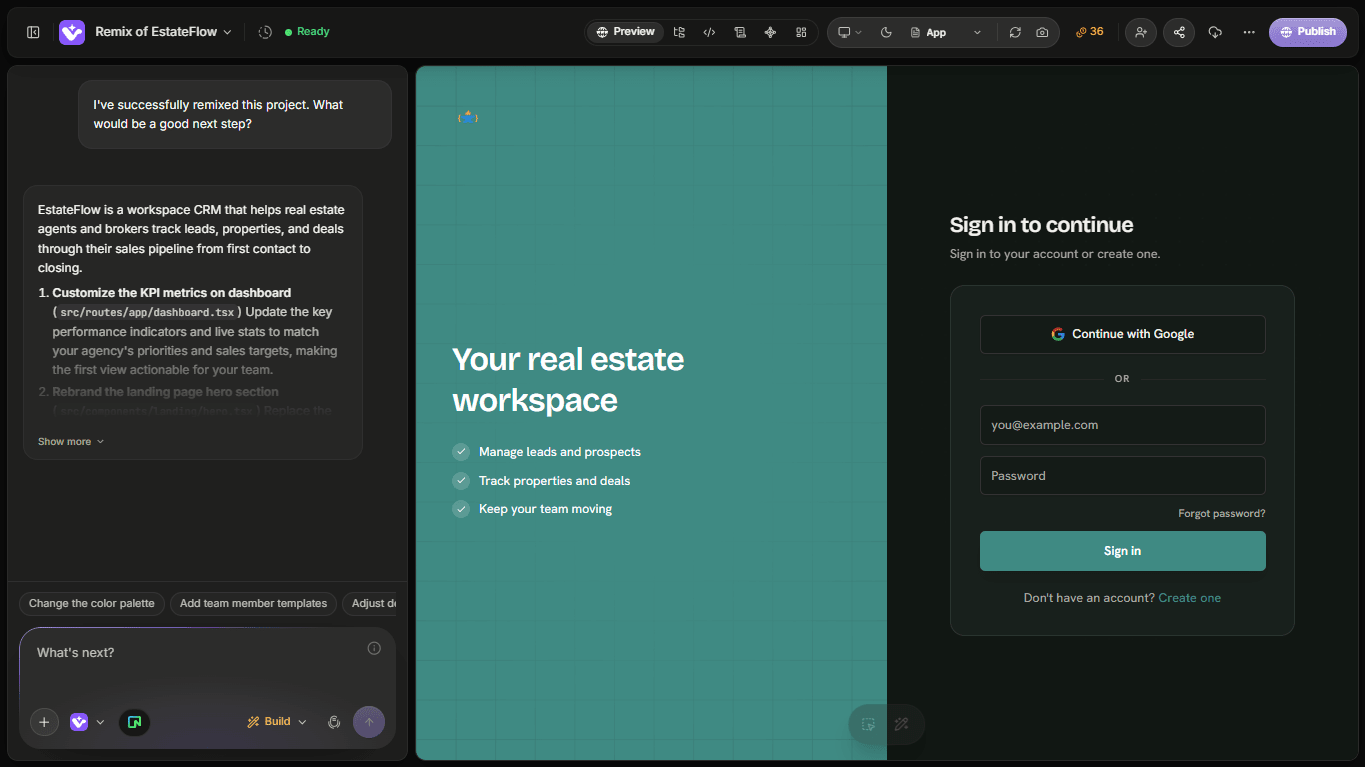
When your application requires user accounts, condoo.Vibe can build authentication into the product.
condoo.Vibe supports:
Google authentication
Email and password authentication
For example, you can tell condoo.Vibe:
Add authentication to this application. Users should be able to create an account with email and password or continue with Google. After signing in, take them to the dashboard.
condoo.Vibe can build the authentication experience as part of the application.
You don't need to build authentication first
You don't have to begin your project by manually creating login infrastructure.
You can describe the product.
For example:
Build a client portal where customers can create an account, sign in, view their projects, download files, and send messages to their account manager.
condoo.Vibe can recognize that the application requires user identity and authenticated areas.
Authentication becomes part of the product architecture.
Sign up
For applications that allow registration, new users need a way to create an account.
A typical signup experience might include:
Create your account

Name
Email
Password

[Create account]

or

[Continue with Google]
After signup, you can define what should happen next.
For example:
After a user creates an account, take them through onboarding before they can access the dashboard.
Or:
After signup, create their workspace automatically and redirect them to the dashboard.
Authentication can be connected to the rest of your application's workflow.
Sign in
Returning users need a way to access their existing account.
For example:
Welcome back

Email
Password

[Sign in]

[Continue with Google]
Once authenticated, the application can identify the user and give them access to the appropriate experience.
You can also describe where users should go afterward:
After successful sign-in, redirect users to /app.
Or:
After sign-in, return the user to the page they originally tried to access.
Google sign-in
Google authentication can reduce friction by allowing users to access your application with their Google account.
Instead of creating another password, users can choose:
Continue with Google
For products where quick onboarding matters, providing both Google and email/password authentication gives users more flexibility.
Protected pages
Not every page in your application should necessarily be publicly accessible.
A SaaS application might have:
Public pages
//pricing/features/login/signup
Anyone can visit these pages.
Protected pages
/app/app/projects/app/customers/app/team/app/settings
These pages require authentication.
If a signed-out user attempts to access a protected area, the application should direct them to authenticate before continuing.
Tell condoo.Vibe what should be protected
You can describe access requirements in natural language.
For example:
The marketing website should remain public, but users must sign in before accessing the dashboard, projects, team, or settings.
Or:
Anyone can browse properties, but users must create an account before saving a property to their favorites.
Or:
Customers must be signed in to view their orders.
These are product requirements.
condoo.Vibe can translate them into authentication behavior.
Authentication and your database
Authentication becomes especially useful when combined with your project's database.
Suppose your database contains:
Projects
Each project might have an owner.
Conceptually:
User
 ↓
Project
When the user signs in, the application knows who they are.
It can then retrieve the data associated with that account.
For example:
Show users only the projects that belong to them.
This combines:
Authentication → Who is this?
Database → What projects exist?
Application logic → Which projects should this user see?
Authentication is not authorization
This distinction becomes important as applications become more sophisticated.
Authentication determines who the user is.
Authorization determines what that user is allowed to do.
For example:
Sarah signs into the application.
Authentication tells the application:
- This is Sarah.
- Sarah is an Agent.
Authorization might then determine:
Sarah can view and manage leads assigned to her, but she cannot access workspace billing.
These are two different responsibilities.
Roles and permissions
Many applications need different types of users.
For example, an agency platform might have:
- Owner
- Admin
- Agent
You could define their permissions as:
Owner
Can manage the entire workspace, team, billing, and application settings.
Admin
Can manage most workspace functionality and team operations.
Agent
Can work with the operational features they have permission to access.
You can describe these requirements directly:
Add Owner, Admin, and Agent roles. Only Owners should access billing. Owners and Admins can invite team members. Agents can manage leads and deals but cannot change workspace settings.
condoo.Vibe can build application behavior around those requirements.
Protect actions, not just pages
Authorization shouldn't only determine whether someone can open a page.
It can also determine whether they can perform specific actions.
For example:
An Agent may be allowed to:
- View leads
- Create leads
- Update leads
but not:
- Delete team members
- Change billing
- Delete the workspace
You can tell condoo.Vibe:
Agents can create and update customers but only Owners and Admins can delete customer records.
This creates more granular permissions within the application.
Multi-user applications
Authentication becomes particularly important when multiple people use the same product.
Imagine you're building project management software.
A company creates a workspace and invites five employees.
Conceptually:
Workspace
   │
   ├── Owner
   ├── Admin
   ├── Member
   ├── Member
   └── Member
The users are authenticated individually but belong to the same workspace.
Your application can then associate data with that workspace:
Workspace
   │
   ├── Users
   ├── Projects
   ├── Tasks
   ├── Files
   └── Activity
This allows multiple authenticated users to collaborate inside the same organization.
Data isolation matters
For multi-tenant SaaS applications, authentication alone isn't enough.
Suppose:
- Company A uses your CRM.
- Company B also uses your CRM.
Their information must remain separate.
Company A
├── Users
├── Leads
└── Deals

Company B
├── Users
├── Leads
└── Deals
A user from Company A should never receive Company B's private data simply because both use the same application.
This requires appropriate authorization and data-scoping rules in addition to authentication.
For example:
Every lead, deal, and customer must belong to a workspace. Users must only be able to access records belonging to workspaces where they are members.
For applications handling private customer or business data, requirements like this are critical.
Authentication can drive personalization
Knowing who is signed in also allows your application to personalize the experience.
For example:
Good morning, Sarah.
Or:
Your Projects

Website Redesign
Mobile Application
Marketing Dashboard
Or:
Tasks assigned to you
You can ask condoo.Vibe:
Personalize the dashboard using the signed-in user's first name and show their assigned tasks.
Authentication provides the user identity required to build these experiences.
Authentication and onboarding
Signing up doesn't necessarily mean a user should immediately land on the main dashboard.
Some applications need onboarding first.
For example:
Create Account
     ↓
Create Workspace
     ↓
Choose Business Type
     ↓
Invite Team
     ↓
Dashboard
You can describe this workflow:
After registration, new users should create their workspace, enter their company name and industry, and then reach the dashboard. Team invitations can be skipped during onboarding.
condoo.Vibe can connect authentication with the product's onboarding experience.
Authentication and existing users
As your application evolves, you may want to change what happens after users authenticate.
For example:
Existing users should continue going directly to their dashboard. Only newly registered users should see the new onboarding flow.
This is an important distinction.
Whenever changing authentication or onboarding in an application with existing users, clearly explain what should happen to both new and existing accounts.
Plan complex authentication changes first
Some authentication changes have consequences throughout an application.
For example:
Convert this single-user application into a multi-tenant SaaS where companies can create workspaces, invite users, assign roles, and keep all company data isolated.
This can affect:
- Authentication
- Database structure
- Authorization
- APIs
- Existing records
- Navigation
- User onboarding
- Invitations
- Application state
For changes like this, use Plan Mode before implementation.
Don't expose sensitive information
Authentication systems deal with sensitive information.
Passwords, authentication secrets, tokens, and private credentials should not be displayed in public interfaces or exposed in client-side code.
You generally shouldn't ask condoo.Vibe to:
Put the authentication secret directly in this frontend file.
Instead, sensitive values should remain in the appropriate secure server-side or configuration environment.
The same principle applies to API keys, database credentials, and other secrets.
Example prompts
Here are some examples of authentication requirements you can give condoo.Vibe.
Simple SaaS
Add Google and email/password authentication. The homepage and pricing page should remain public. Everything under /app should require authentication.
Customer portal
Customers should create accounts before accessing the portal. After signing in, they should only see projects associated with their account.
Team application
Add workspaces with Owner, Admin, and Member roles. Owners can manage billing and the entire team. Admins can invite members and manage projects. Members can only access projects assigned to them.
Marketplace
Buyers can browse without signing in, but they must authenticate before purchasing or saving products. Sellers must authenticate before accessing the seller dashboard.
Internal tool
There should be no public registration. Only invited users should be able to access the application.
You describe the access model.
condoo.Vibe builds the experience around it.
Test authentication as different users
If your application has multiple roles, don't test everything from one account.
For example, if your application has:
- Owner
- Admin
- Agent
test each role.
Check whether the Owner can access billing.
Check whether the Admin has the correct team controls.
Check whether the Agent is prevented from accessing restricted functionality.
Also test what happens when you're signed out.
Authentication and permissions are only working correctly if each user receives the experience they're supposed to have.
A useful mental model
Think about access in three layers:
1. Who are you?
Authentication.
This is Sarah.
2. Where do you belong?
Membership / ownership.
Sarah belongs to Acme Realty.
3. What can you do?
Authorization.
Sarah is an Agent and can manage leads but cannot access billing.
Together:
Identity
   ↓
Membership
   ↓
Permissions
   ↓
Application Access
This becomes increasingly important as your application grows beyond a single user.
You describe the access model
You don't need to start by designing an authentication architecture.
Start with questions such as:
- Who uses this application?
- Do they need accounts?
- What should be public?
- What requires sign-in?
- Are there different types of users?
- What can each role do?
- Which data should each user be allowed to access?
Describe those requirements to condoo.Vibe.
Your AI product team can help turn them into the application's authentication and authorization behavior.
Next: Adding Forms, Uploads, Email & Payments
Authentication identifies your users, and your database stores application data.
But real products often need to interact with the outside world too.
Next, we'll look at how you can ask condoo.Vibe to add functionality such as:
Forms → File Uploads → Email → Payments
and how condoo.Vibe can connect these capabilities to the workflows you're building.