 condoo.Vibe
Resend
Connect Resend to send transactional email from your condoo.Vibe app: welcome, booking, order, invitation, and status notifications.
Resend lets applications you build with condoo.Vibe send transactional emails.
You can use Resend for:
- Welcome emails
- Email confirmations
- Booking confirmations
- Order receipts
- Contact-form notifications
- Team invitations
- Account notifications
- Status updates
- Application-triggered emails
Once Resend is connected, tell condoo.Vibe when an email should be sent, who should receive it, and what it should contain.
Connect Resend. Describe the event. condoo.Vibe builds the email workflow.
What is transactional email?
Transactional emails are messages triggered by something happening inside your application.
For example:
Customer books appointment
        ↓
Booking saved
        ↓
Confirmation email sent
Or:
User creates account
        ↓
Account created
        ↓
Welcome email sent
Or:
New lead submits form
        ↓
Lead saved
        ↓
Sales team notified
Unlike a newsletter or promotional campaign, these emails are typically triggered by a specific application event.
What you can build with Resend
Welcome emails
Send new users a welcome email after they successfully create an account.
Booking confirmations
Send customers a confirmation email containing their service, appointment date, time, and booking reference.
Internal notifications
Email our sales team whenever a new demo request is submitted.
Team invitations
When an administrator invites a team member, send the invited user an email containing the invitation.
Order confirmations
After payment is successfully confirmed, email the customer their order details.
Status notifications
Notify customers when their project status changes to Ready for Review.
These emails can become part of the workflows condoo.Vibe builds for your application.
Before You Start
You'll need a Resend account and the credentials required to use Resend's email service.
Depending on how you intend to send email, you may also need to configure and verify a sending domain with Resend.
Connect Resend to condoo.Vibe
Open your condoo.Vibe project and navigate to Connectors.
Find Resend and select it.
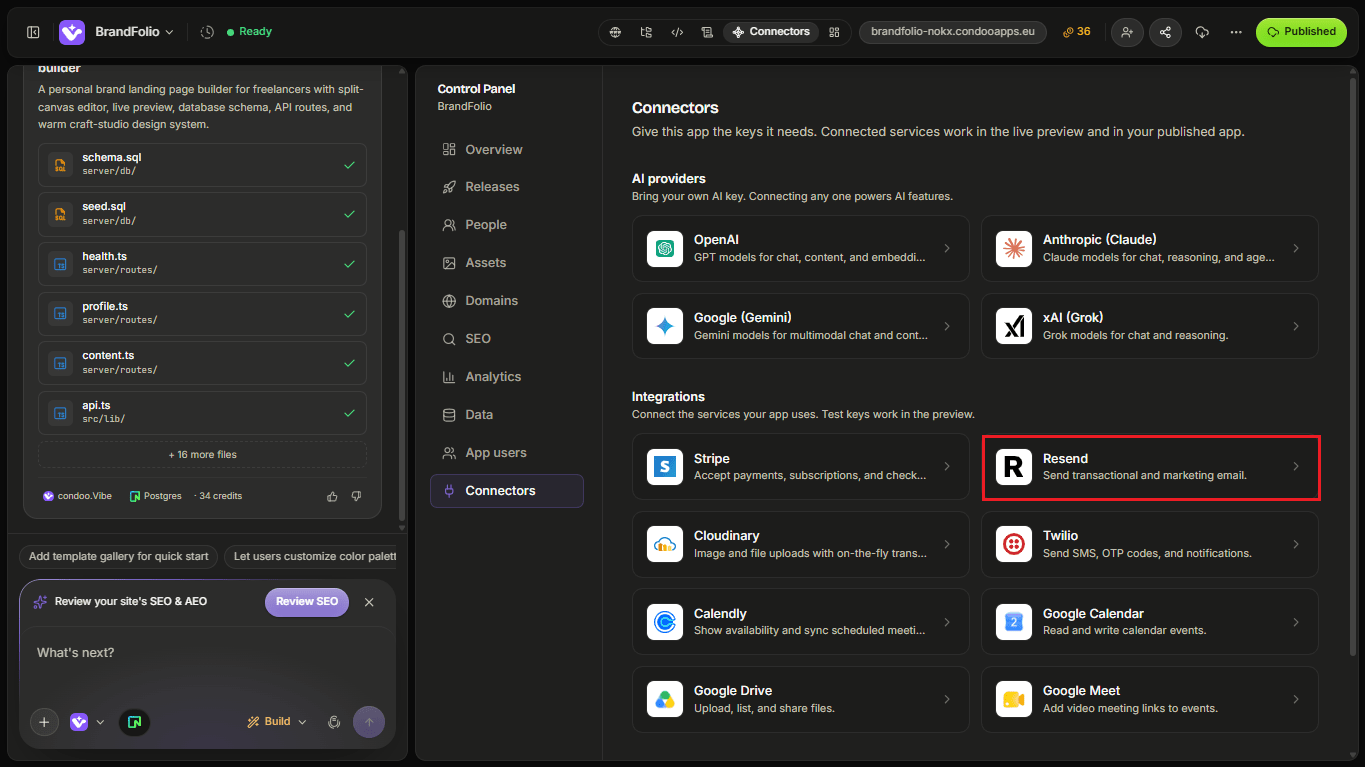
Follow the connection flow and provide the credentials requested by condoo.Vibe.
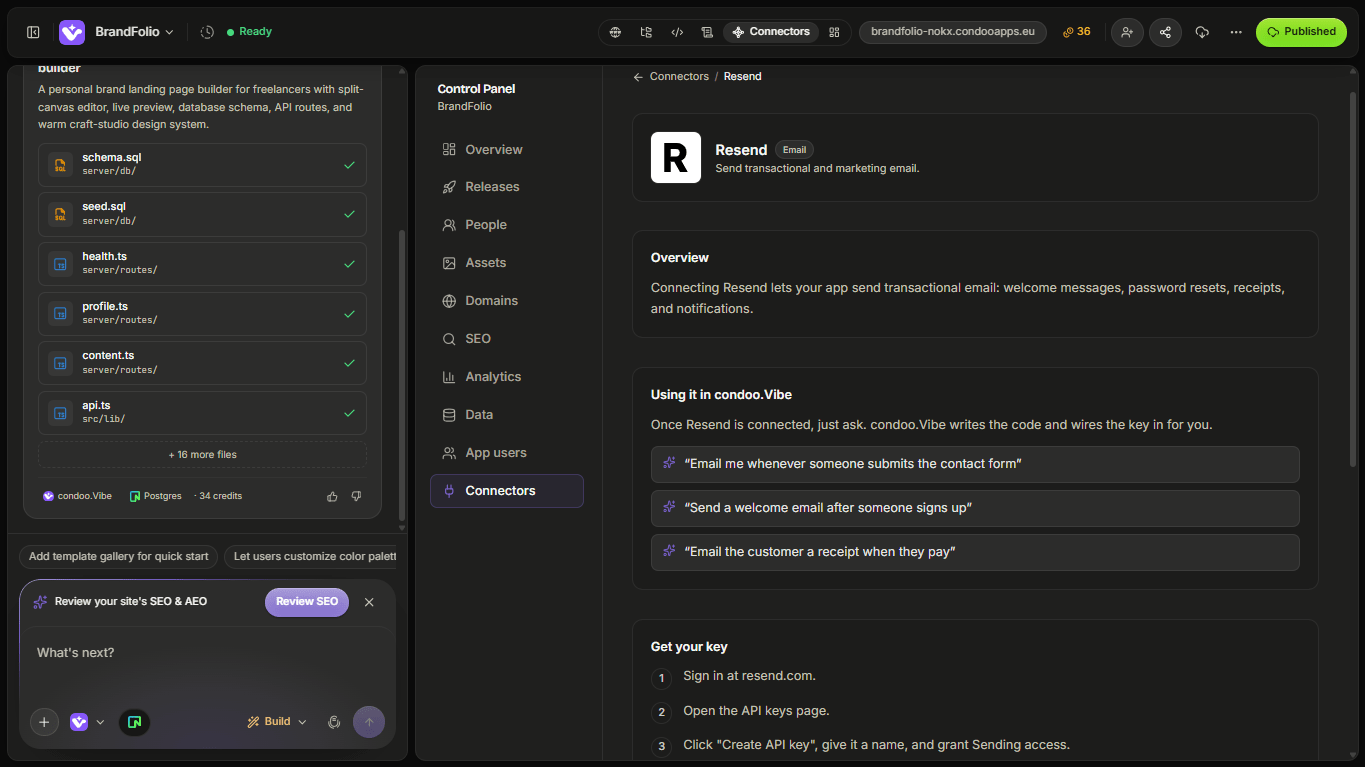
Once connected, you can begin asking condoo.Vibe to build email functionality into your project.
Your First Email Workflow
Let's say you're building a booking application.
You could tell condoo.Vibe:
When a customer successfully creates a booking, send them a confirmation email containing their name, service, appointment date, appointment time, and booking reference.
The workflow might look like:
Customer books
      ↓
Validate booking
      ↓
Save to Neon
      ↓
Booking confirmed
      ↓
Send through Resend
      ↓
Customer receives email
Notice that the email is connected to a successful application event.
Define when the email should send
Be specific about the trigger.
Instead of:
Send a booking email.
Try:
Send the customer a confirmation email only after the booking has been successfully saved.
Or:
Notify the sales team when a new lead is successfully created from the Request a Demo form.
The trigger tells condoo.Vibe when the email workflow should run.
Define who receives it
Tell condoo.Vibe who should receive the message.
For example:
Send the confirmation to the email address provided by the customer during booking.
Or:
Send new lead notifications to sales@mycompany.com.
Or:
Send the invitation to the email address entered by the workspace administrator.
Some workflows may have multiple recipients.
For example:
After a booking is confirmed, send the customer a confirmation and notify the assigned staff member about the new appointment.
Define What the Email Contains
condoo.Vibe can use application data to personalize emails.
Suppose your database contains:
Customer
Sarah Chen

Service
Strategy Consultation

Date
September 15

Time
2:00 PM

Booking Reference
BK-10482
Your email can use that information.
For example:
Hi Sarah,

Your Strategy Consultation has been confirmed.

Date: September 15
Time: 2:00 PM
Booking: BK-10482
You don't have to hard-code every customer's information.
The application can use the data associated with the event.
Use dynamic information
You can tell condoo.Vibe:
Personalize the booking confirmation using the customer's first name and include the booking's service, date, time, and reference number.
Or:
Include the project name, current status, and account manager in the project-update email.
This allows one email workflow to work across many users and records.
Customer and Internal Emails
One event can trigger different emails for different audiences.
Imagine a consultation request.
Customer
Receives:
Thanks, Sarah. We've received your consultation request and will be in touch shortly.
Sales team
Receives:
New consultation request from Sarah Chen at Acme Ltd.
The workflow becomes:
Form Submitted
      ↓
Save Lead
      ↓
   ┌──┴──┐
   ↓     ↓
Customer  Sales Team
Email     Notification
You can describe both behaviors in the same request.
Example: Contact Form
Suppose your website has:
Name
Email
Company
Phone
Message

[Send Message]
You could tell condoo.Vibe:
When the contact form is successfully submitted, save the enquiry to the database, send the customer a confirmation email, and notify our sales team with the enquiry details.
This combines:
Form → Database → Resend
rather than treating the form as an isolated component.
Example: Welcome Email
For a SaaS product:
After a new user successfully creates their account, send a welcome email using their first name. Include a button that takes them back to their dashboard.
Conceptually:
Account Created
      ↓
User Saved
      ↓
Send Welcome Email
      ↓
Dashboard CTA
Example: Team Invitation
Suppose your application allows workspace Owners to invite team members.
You might ask:
When an Owner invites a team member, create a pending invitation and email the invited user. Include the workspace name, who invited them, and a button to accept the invitation.
This connects Resend with your application's authentication and team system.
Example: Payment Confirmation
Resend can also work alongside Stripe.
For example:
Stripe Payment
      ↓
Payment Confirmed
      ↓
Purchase Recorded
      ↓
Resend
      ↓
Receipt / Confirmation
You could tell condoo.Vibe:
After Stripe confirms the $99 course purchase, record the purchase, grant access, and send the customer a purchase confirmation email.
Example: Status Updates
Emails can also be triggered by changes to your application data.
For example:
When a project changes from In Progress to Ready for Review, email the customer and include a link to the project portal.
Or:
When an order changes to Shipped, email the customer with their tracking information.
Or:
When a support ticket receives a staff response, notify the customer by email.
This turns application activity into communication.
Sending Domain
For production email, you'll generally want messages to come from your own domain.
For example:
Your sending-domain configuration is handled through Resend.
Depending on the configuration, Resend may ask you to add DNS records to verify that you're authorized to send email for that domain.
Follow Resend's domain verification process before relying on the address for production email.
Use an appropriate From address
Choose a sender that makes sense for the type of email.
For example:
Acme <hello@acme.com>
or:
Acme Support <support@acme.com>
or:
Acme Notifications <notifications@acme.com>
You can tell condoo.Vibe which verified sender should be used for a workflow.
Reply-To
Sometimes the sending address and reply destination should be different.
For example, notifications may be sent from:
notifications@acme.com
but you want customer replies to go to:
support@acme.com
Where appropriate, configure the email workflow so replies reach the right destination.
Email Design
Transactional emails don't have to be plain text.
You can ask condoo.Vibe to create branded email experiences.
For example:
Create a clean booking confirmation email using our brand name and styling. Include the booking details in a simple summary card and a button to manage the booking.
Keep transactional emails focused.
The user should immediately understand:
- Why did I receive this?
- What happened?
- Is there anything I need to do?
Build for Failure
Email delivery can fail even when the main application action succeeds.
Imagine:
Booking Created ✓
Email Failed ✕
Should the customer's booking disappear because the confirmation email failed?
Usually, no.
The booking and the notification are different operations.
For example, you could specify:
If the booking is created successfully but the confirmation email fails, keep the booking and log the email failure. Don't tell the customer their booking failed.
This distinction becomes important for reliable application workflows.
Don't create duplicate emails
Some actions can accidentally be triggered more than once.
For important transactional workflows, make sure repeated requests don't create unnecessary duplicate messages.
For example:
Don't send another welcome email every time an existing user signs in.
The trigger should be:
Account created
not:
User authenticated
Likewise, payment confirmations should correspond to the appropriate confirmed transaction rather than every page load.
Common Problems
Emails aren't sending
First determine whether the main application action works.
For example:
Bookings are being saved successfully, but confirmation emails aren't being sent.
This is much more useful than:
Booking doesn't work.
Use Debug Mode and isolate the email portion of the workflow.
Domain isn't verified
If you're attempting to send from your own domain, check the domain status in your Resend account.
Make sure the required DNS configuration has been added correctly.
Wrong sender address
Make sure the From address you're trying to use is permitted by your Resend configuration.
Email sends but contains incorrect information
This may be an application-data issue rather than a Resend connection problem.
Tell condoo.Vibe:
Booking confirmation emails are sending successfully, but the appointment time shown in the email is incorrect. The dashboard shows the correct time. Debug how the booking time is being passed into the email template.
Customers receive duplicate emails
Tell condoo.Vibe:
Some customers are receiving two booking confirmation emails for one booking. Investigate the email trigger and ensure each confirmed booking sends only one confirmation.
Debugging Resend
Use Debug Mode when your email workflow isn't behaving correctly.
For example:
Expected: After a booking is created, the customer should receive a confirmation email.
Actual: The booking is saved correctly, but no email arrives.
The booking functionality itself is working.
Debug the Resend email workflow and identify why the confirmation isn't being sent. Preserve the existing booking functionality.
This tells condoo.Vibe exactly where to focus.
Keep Your API Key Secure
Your Resend API key provides access to your Resend account's email functionality.
If you believe the key has been exposed, revoke or rotate it through Resend and update your condoo.Vibe connection.
A Good Email Workflow Prompt
A strong request usually defines:
Trigger
When should the email send?
Recipient
Who receives it?
Content
What information should it contain?
Action
Should the recipient be able to click somewhere?
Failure behavior
What happens if sending fails?
For example:
After a customer successfully books an appointment, send a confirmation email to the customer's booking email address. Personalize it with their first name and include the service, staff member, date, time, and booking reference. Include a button linking to their booking. If email delivery fails, don't cancel the booking.
That's significantly more useful than:
Send an email.
Test Before Publishing
Before launching an email workflow, test it.
Check:
- Is the email triggered at the correct time?
- Does it go to the correct recipient?
- Is the From address correct?
- Is personalization correct?
- Are dates and times correct?
- Do links work?
- Does it look acceptable on mobile?
- What happens if sending fails?
- Is the same email accidentally sent twice?
For important workflows, test several scenarios rather than only the ideal path.
Think in Events
The easiest way to design email functionality is to think:
When X happens, send Y to Z.
For example:
- When a user registers, send a welcome email to the user.
- When a booking is confirmed, send booking details to the customer.
- When a demo request arrives, send a lead notification to the sales team.
- When an invoice becomes overdue, send a reminder to the customer.
You define the event and outcome.
condoo.Vibe builds the workflow around Resend.
Next: Twilio
Email isn't always the best communication channel.
Next, we'll look at Twilio, which can enable communication workflows such as SMS inside applications you build with condoo.Vibe.